D2C Playbook 1 -- The Data Foundation: Fix Your Owned Layer Before You Scale Spend
The short version
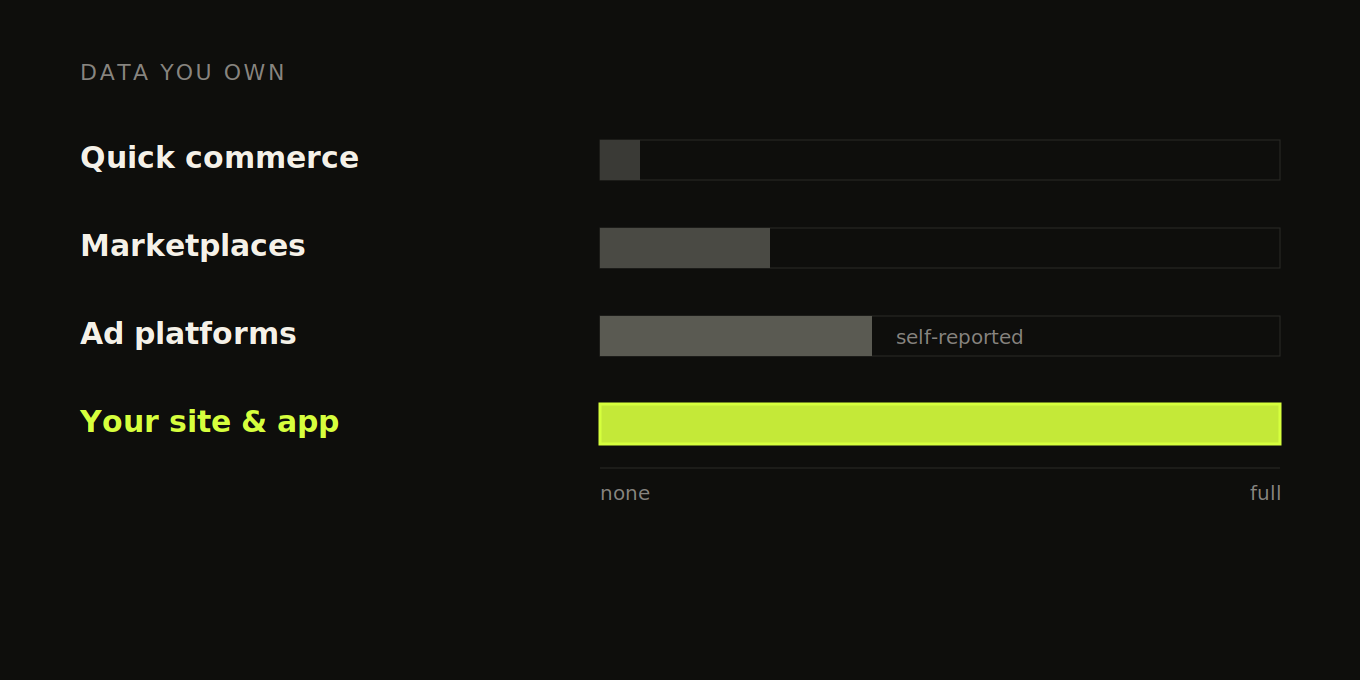
Here's the thing nobody tells you when you're about to scale spend. Every channel you're about to pour money into gives you data you can't fully trust. Quick commerce hands you almost nothing about who your customer is. Meta and Google grade their own homework and, surprise, they're doing great. The one place you actually own the full picture is the website and app you built. So that's the layer you have to get right first.
And most brands have it quietly broken. Not broken in a way that throws an error, which would be easy. Broken in three specific places: the events you capture, the way you stitch one human's activity together, and whether your numbers come from your own server or from a browser script that misses a chunk of what happened. All three fail silently. You won't see a red flag. You'll just make decisions on numbers that are a little bit wrong, and then you'll scale those decisions, and the little bit wrong becomes a lot of money wrong.
This playbook is about fixing that foundation before you build anything on it. It's the boring part. It's also the part that decides whether every clever thing you do later actually works. We'll get to attribution, retention, RFM, incrementality, MMM across this series. None of it survives contact with a broken owned-data layer. So we start here.
Which of your channels give you data you actually own?
Let me map the channels honestly, because this is the whole reason this playbook comes first.
Quick commerce is the big one for Indian D2C right now, and it's a black box. You list on Blinkit or Zepto or Swiggy Instamart, you move volume, and you learn basically nothing about the person who bought. No email, no phone, no idea if they've bought from you before or if it's their first time. You get a sales number and a payout. That's it. The platform owns the customer, you rent the shelf. It's a real channel and you probably can't ignore it, but treat it as a revenue source, not a data source, because it will never be one.
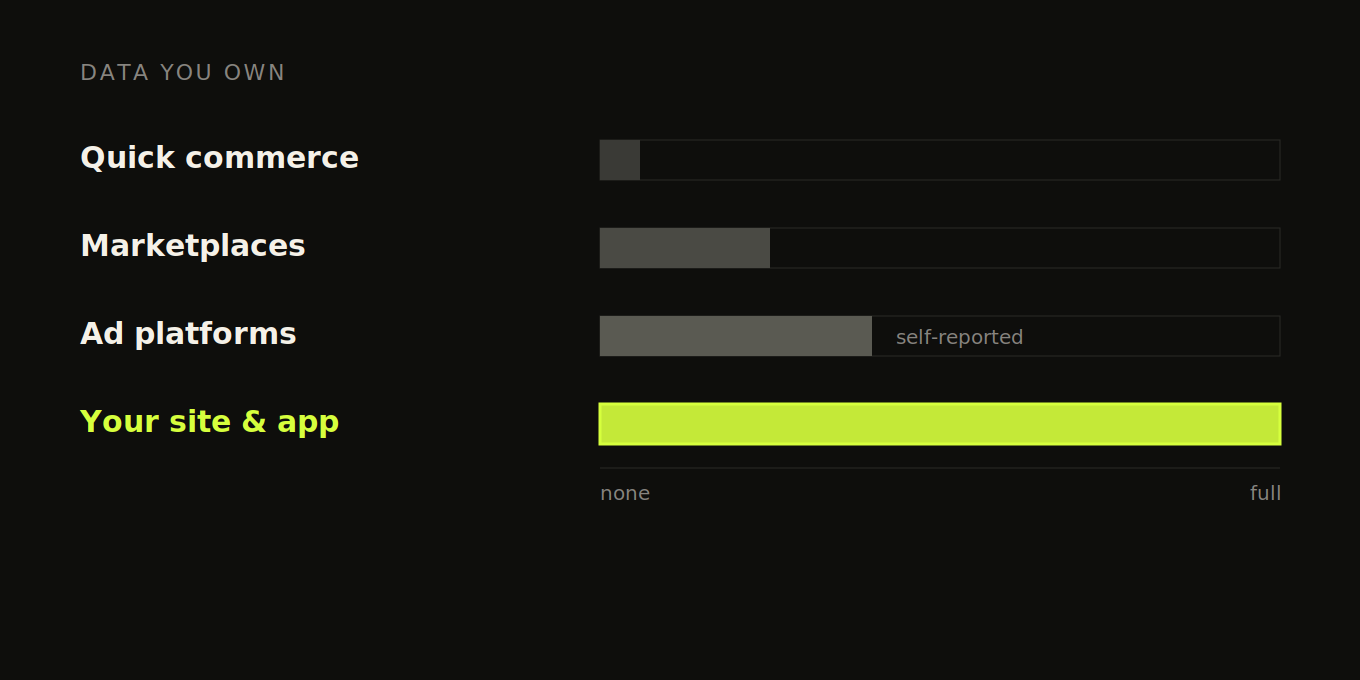
Marketplaces like Amazon and Flipkart are a half-step better. You get a bit more, some order-level reporting, maybe a brand store with its own analytics. But you're still mostly seeing what they choose to show you, and the customer relationship still mostly belongs to them.
Then there's the ad platforms, and this is where you get fooled the most. Meta and Google will happily tell you they drove your sales. Of course they will. Their attribution is built to make their spend look good, and it counts conversions in ways that overlap, overstate, and double-claim. We'll spend a whole playbook on that later. For now just hold the thought that a platform reporting on its own performance is not a neutral source.
Your site and app are different. When someone lands on your store, browses, adds to cart, checks out, the events that describe all of that fire on a property you control. You decide what to capture, how to name it, where it goes. You own the raw stream. That ownership is the entire point. Everything downstream in this series, every cohort, every CAC number, every retention curve, is only as trustworthy as that owned stream. Which is why it's worth being a little obsessive about getting it right.
How many events should a D2C brand track?
The instinct when you set up tracking is to track everything. Resist it. A pile of 80 events nobody can interpret is worse than 8 clean ones, because the noise hides the signal and your team stops trusting any of it.
What you actually need is a small spine of events that describe the journey from "looked at something" to "gave you money," each carrying enough context to be useful. Roughly: a product viewed, an add to cart, a checkout started, and a purchase. Maybe a couple more depending on your model. The exact list matters less than the discipline of keeping it small and giving each event the properties that make it answerable later. A Product Viewed event that doesn't carry the product ID, price, and category is almost useless. The same event with those properties lets you answer real questions about what gets looked at versus what sells.
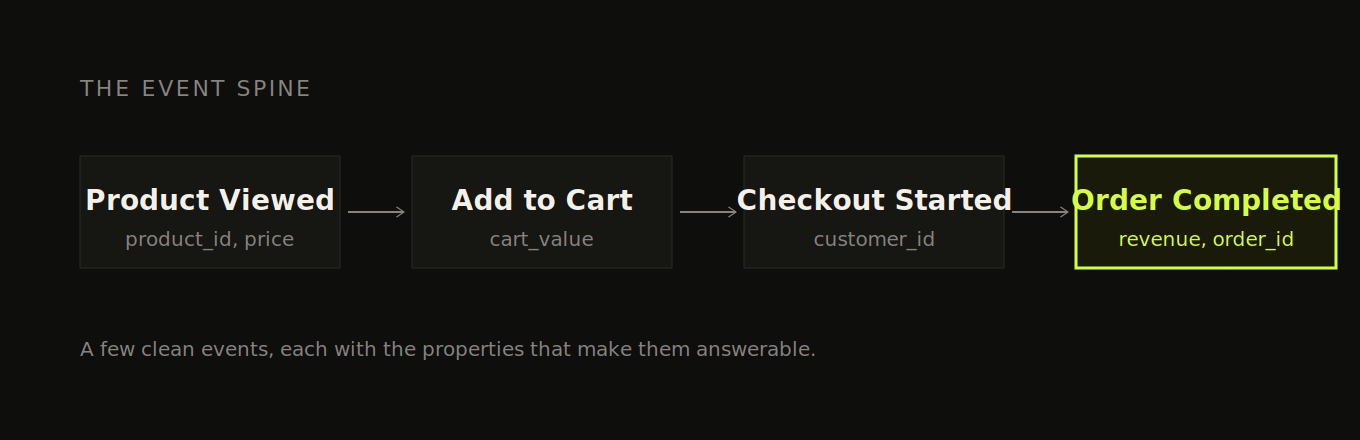
Use the object-action naming convention, Product Viewed, Order Completed, and so on, and write it down somewhere your engineers will actually look, in an event tracking plan. This sounds trivial. It is not. The single most common mess I see is the same event named three different ways because nobody agreed on a convention, and now your data is fractured at the source.
Now, the setup is genuinely different depending on what you're on, so let me do both side by side.
If you're on Shopify, the big thing to know is that the old way of customizing checkout is gone. Shopify deprecated checkout.liquid in two phases, the information, shipping and payment pages in August 2024, and the thank-you and order-status pages in August 2025, with auto-upgrades rolling out from January 2025. If your tracking relied on scripts injected into those pages, it broke, and you may not have noticed. The current model splits your tracking across Theme Liquid for the normal site pages and Customer Events (a sandboxed pixel) for the checkout. One real catch for smaller brands: the full checkout extensibility toolkit, the UI Extensions and Functions, is Shopify Plus only. If you're not on Plus, you've got a more limited set of options, so plan around that rather than assuming you can do everything the agency blog posts describe. And verify what Shopify's native GA4 integration actually sends rather than assuming it covers you. The current Google & YouTube channel does fire the standard ecommerce events, but custom events, extra properties you've defined, and full checkout-step tracking on non-Plus stores often still need their own setup. Check which events are actually landing before you trust the funnel.
If you're on a custom stack or a mobile app, you've got more freedom and more rope to hang yourself with. You're firing events through an SDK, PostHog or Mixpanel or Segment or whatever you've chosen, and you control the whole thing. The discipline is the same: small event spine, consistent names, properties that make events answerable. The app-specific trap is screen tracking. It's tempting to fire an event on every screen and every modal open, and then you drown. Track the screens that map to real intent, product detail, cart, checkout, and skip the micro-stuff unless you have a specific use for it.
Why does identity stitching fail, and what breaks when it does?
This is the section to read twice. Partly because identity is the thing that fails without ever throwing an error, and partly because most content about it lies to you, and I'd rather tell you the real shape of the problem.
Here's the scene everyone uses to sell you on identity stitching. Someone sees your Instagram ad on their phone, taps through, browses, adds to cart, then leaves without buying. A few hours later they come back on their laptop, create an account, and check out. Obviously one person, right? The pitch is that identity stitching connects these into one journey.
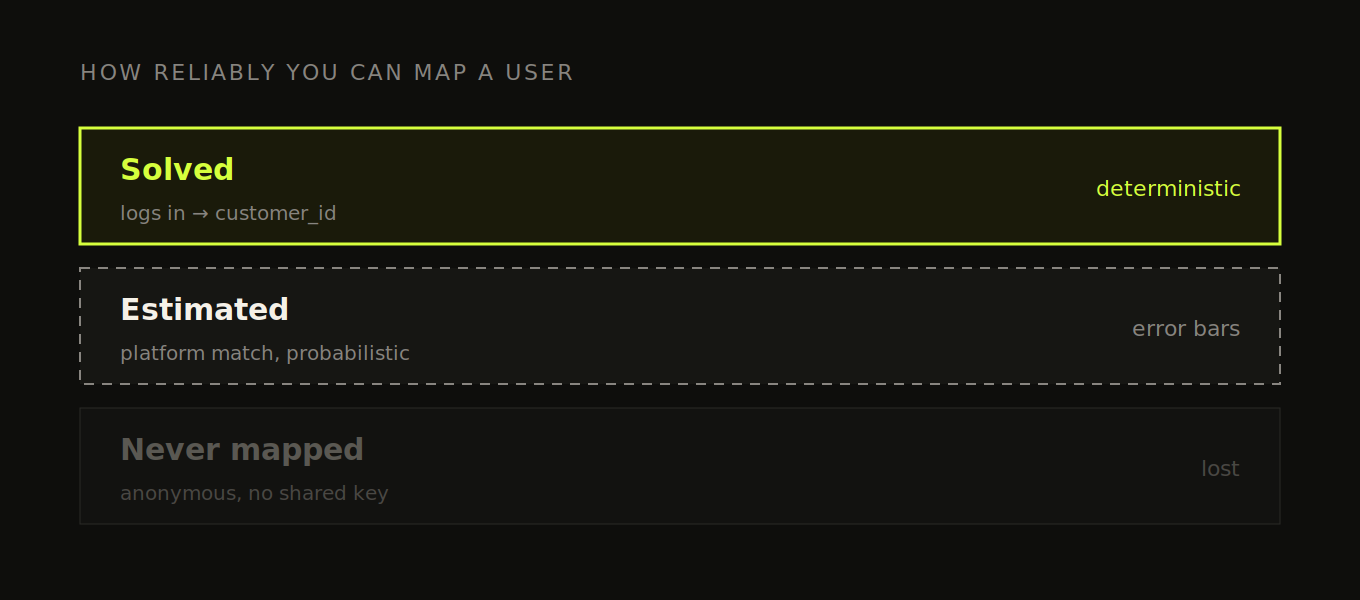
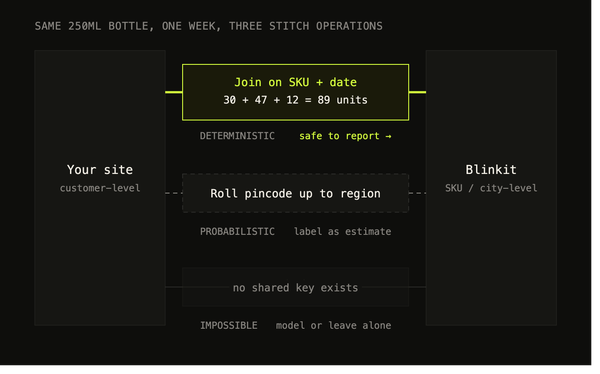
Here's the truth. In that exact scenario, you usually cannot connect them, and no amount of setup fixes it. Think about what you actually have. On mobile, the person was anonymous. They never gave you anything, just a random device-level ID your analytics assigned. On desktop, they're a known customer with an email and an order. There is no shared key between those two sessions. Nothing links the anonymous mobile device to the desktop account, because at no point did the same identifier touch both. You can want them to be one person all you like. The data simply doesn't contain the bridge.
So let me separate the case you can solve from the case you mostly can't, because they get lumped together and that's where the false promises come from.
The case you can solve, deterministically. If the same person logs into your site or app, you've got them, full stop. The moment they authenticate, the moment they hand you an email, a phone, or sign into an account, you call identify() with a stable identifier: your own internal user ID, or their hashed email. The same value every time, on web, on app, and on your server.
Here's what that call actually does, because this is the mechanic nobody bothers to explain. Before identify(), that person's browsing fired under a random anonymous ID your analytics handed out, something like anon_4f9c. The events exist, they're just attached to a meaningless string. When you call identify() with a real ID, your analytics tool retroactively merges that anonymous event history into the known person's profile. The product views, the add to cart, all of it reattaches to the real human. That retroactive merge is what "identity stitching" actually is. There's no magic to it. It's connecting an anonymous ID to a real one through a shared key, and the key is the moment the person identified themselves to you.
The rule that makes this reliable is concrete, and it's where most setups quietly break: call identify() every time you have a durable identifier, not just once at signup. Signup, every login, and every return visit where they're already authenticated. The common bug is identifying a user once when they create the account, then assuming the session remembers them forever, so when they come back two weeks later on a fresh session, nobody re-identifies them, and that whole visit lands on a new anonymous profile instead of theirs. Re-identify on every authenticated session. And pick one canonical identifier and use it everywhere. Never let the same human end up with two different canonical IDs across web and app, because the moment that happens you've split one customer into two and you're back to the exact problem you were trying to solve.
The case you mostly can't solve, and how imperfect each fallback really is. When the same person never shares an identifier across two contexts, you're left with imperfect bridges. Know exactly how imperfect each one is before you lean on it:
→ A stable identifier captured early (hashed email or phone). The most reliable of the imperfect options, but it only works once they've handed it over, and in most flows that's at checkout, after all the anonymous browsing you wanted to attribute. So it rescues your returning and known users far more than it rescues that first cold session. Worth doing. Not a fix for the anonymous case.
→ IP address plus user-agent. Cheap and weak. A whole household or office shares one IP, carrier NAT puts thousands of phones behind a single address, and one person's user-agent shifts the moment they update their browser. You get both false merges, two people fused into one, and missed merges. Treat it as a faint hint, never a key.
→ Browser fingerprinting. More identifying than IP plus user-agent, but degrading fast because browsers now actively fight it, legally fraught under DPDP and GDPR, and still only probabilistic. Not something to build your core identity on.
→ Platform-side matching (the bridge you rent rather than own). This is the one that actually moves the needle on true cross-device, because the same human is almost certainly logged into Meta or Google on both devices, inside a walled garden you can't see into. You feed it by sending your conversions back server-side with hashed email, phone, and the click IDs that ride along on ad clicks (the fbclid and gclid). The catch: the match happens in their black box, you get a modeled number not a verified one, and you take it partly on faith.
Put it plainly: some of your users you map perfectly, some probabilistically, some you never map at all, and a setup that pretends otherwise is selling you certainty that doesn't exist. The goal isn't a perfect identity graph. It's a deterministic core that's actually solid, honest estimates layered on top, and clarity about which is which so you don't build confident decisions on the guessed parts.
I know this is the least fun section. But if you fix nothing else here, fix your understanding of this: a broken event you'll eventually notice, a broken or over-claimed identity graph you won't, and it makes every cohort and retention number in the rest of this series wrong in ways no alert will ever catch.
Why does your Shopify revenue not match Meta's?
If you've ever stared at your Shopify revenue and your Meta-reported revenue and wondered why they don't match, you're not doing anything wrong. The tracking model most stores still run is just out of date for how browsers work now.
Here's the mechanism. The default way you track is a script running in the visitor's browser, the pixel, the GA tag, all of it client-side. And browsers have turned against that. Safari and Firefox block third-party cookies outright. Chrome has stopped short of killing them and moved to a user-choice model instead, but it's tightening the screws in other ways. And ad-blockers across all of them simply refuse to send anything to a domain they recognize as google-analytics.com or facebook.com. So a chunk of your events never make it out of the browser. How big a chunk depends on your traffic mix and how privacy-conscious your audience is. Browser-only data loss commonly runs 10% to 30%, and climbs higher still for audiences heavy on ad-blockers or privacy-focused browsers. You don't know where you fall until you measure it, but "somewhere that hurts" is the safe assumption.
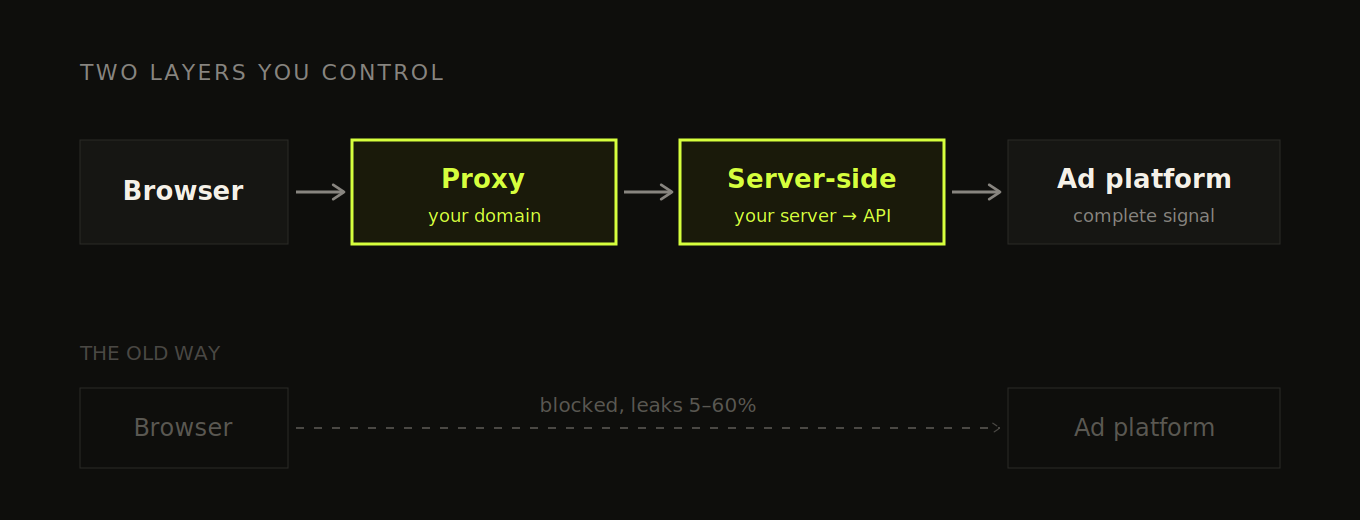
The fix is not one thing, it's two layers that do different jobs, and people muddle them together constantly. So let me pull them apart, because you'll often want both and they solve different parts of the problem.
Layer one: a reverse proxy on your own domain. This is about where the browser thinks it's sending data. Instead of the browser firing events directly at facebook.com or google-analytics.com, you route them through a subdomain you own, something like track.yourbrand.com. To the browser, that's a first-party request to your own site, not a third-party tracker, so most ad-blockers don't recognize it and cookie restrictions ease up. The better-maintained blocklists are starting to catch CNAME-cloaking setups like this, so it isn't bulletproof, but you recover most of what you were losing. This layer also keeps your tracking cookies alive longer, because they're now set in a first-party context.
Layer two: server-side events. This is about who sends the event and what it carries. Instead of trusting the browser to deliver it, your own server sends it directly to the destination, your analytics tool or the ad platform's API: Meta's Conversions API, Google's server-side conversion imports, TikTok's Events API. (Google's Enhanced Conversions is the piece that attaches hashed email and phone to those conversions so Google can match them back to a click, it's a complement to the server-side send, not the whole thing.) A server-to-server call doesn't get blocked, dropped on a flaky mobile connection, or lost when someone closes the tab, and the server can attach the identifiers a match depends on without an ad-blocker stripping them.
Which events go through which layer
The mistake is treating this as all-or-nothing. Route everything through the proxy, or send everything server-side. Neither. The two layers are for two different kinds of event, and matching the event to the layer is the whole skill.
Route your high-volume browsing events through the proxy. Page views, Product Viewed, list views, search, the stuff that fires constantly as people move around your store. You fire a lot of these, each one individually doesn't carry much weight, and the cost of losing a few to an ad-blocker is real but survivable. The proxy recovers most of that loss cheaply, without you having to build server-side plumbing for events you're firing thousands of times a day. This is the right home for the top of your funnel.
Route your money events server-side. Add to Cart, Checkout Started, and above all Order Completed. And here's the part that matters, because it's the part everyone misses: this is not mainly about feeding Meta. It's about your own numbers. Your purchase event is the number your entire CAC, AOV, conversion rate, and revenue analysis sits on top of. If that event is firing from the browser and quietly losing 8% to dropped beacons and closed tabs, your revenue in analytics is 8% light, and every metric you derive from it is wrong, before Meta ever enters the picture.
Server-side fixes that at the root, for three reasons:
→ Reliability. Your server already knows the order happened, it just processed the payment. Firing the event from there means it's guaranteed, not dependent on a browser successfully running a script on a thank-you page after a redirect.
→ Truth. The server can attach the real order value after discounts, the actual payment status, the real product list, instead of whatever stale snapshot the client happened to have.
→ Reconciliation. Server-side purchase events are what let your analytics revenue actually tie out to your Shopify or Stripe numbers. That's the difference between a dashboard you trust and one you're forever squinting at.
So the gradient is simple. Browsing events, proxy. Cart and checkout, server-side if you can, because they gate your funnel math and they're where browser interference starts to bite. Purchase, server-side, no exceptions, because it's the one event you cannot afford to be wrong about and your backend already knows the truth.
| Event type | Layer | Why |
|---|---|---|
| Page / screen views, Product Viewed, search, list views | Reverse proxy (client-fired, routed first-party) | High volume, low per-event stakes. Proxy recovers most ad-block loss with no backend work |
| Add to Cart, Checkout Started | Server-side preferred (proxy at minimum) | Funnel-critical intent events, and where browser and checkout-sandbox interference starts to bite |
| Order Completed / Purchase | Server-side, fired from your backend | The number your CAC, AOV, conversion rate and revenue all depend on. Your server already knows it's true |
The ad-platform benefit, the better matching you get from sending hashed identifiers server-side, is real, and it's a bonus on top. But lead with your own integrity. Get your money events complete and correct for yourself first, and the platform benefit comes along for free. This resource goes deeper on which exact events to send by which method, and where the line sits.
One thing you can't skip: consent
This whole section is built on hashing email and phone and sending them onward to Meta and Google, so let me be straight about something. You can't just do that for everyone. India's DPDP Act, and GDPR if you sell to anyone in the EU or UK, both gate what you're allowed to collect and pass on without consent. Hashing helps, it does not make it a free pass, hashed PII is still PII. So consent state becomes one more thing your tracking layer has to respect: capture whether a user agreed, and let that decide whether their identifiers get sent onward. The good news is the server-side layer is exactly the right place to enforce this, because it sits between your site and the platforms, which means it's where you can cleanly drop or withhold identifiers for users who didn't consent, instead of trying to patch consent logic into a dozen client-side tags. Build it in from the start. Retrofitting consent after you've been shipping PII for a year is a far worse Monday.
The Shopify-specific bug this also fixes
On Shopify, server-side also fixes a concrete bug. When a shopper moves into the checkout, which runs in a sandboxed subdomain context, the first-party cookie holding their GA4 client ID isn't accessible, so their session fragments and one buyer looks like two users with a broken funnel between them. Restoring that client ID server-side through the checkout transition keeps the session whole.
So where do you start? If you're early and your spend is modest, you can often start with just the proxy for cleaner first-party collection, and add server-side conversions when ad performance actually depends on the platforms getting complete data. As you scale spend, server-side stops being optional, because Meta and Google now weight server-confirmed conversions more heavily than pixel-only ones, and accounts feeding them incomplete data get measurably worse results. The strongest setup runs both: the proxy so the browser hands off cleanly in a first-party context, and server-side so your money events reach their destination whole, with their identifiers attached. They're complementary, not alternatives.
What does a clean owned layer actually buy you?
Alright, that was a lot of plumbing. Here's what it buys you, because the work only matters if it buys you something, and it buys you quite a lot.
Once your event spine is clean and your identity graph is solid and your money numbers come from your own server, you can finally answer the questions you've probably been guessing at:
What's my real CAC? Not the platform's flattering version. Your actual cost to acquire a customer who actually bought, measured against spend you trust.
Where do people actually drop off? A funnel built on clean events and stitched identity shows you the true leak, the step where intent dies, instead of a smeared picture where half your users are duplicated and the drop-off is an artifact of broken tracking.
Which customers come back? You literally cannot do cohort or retention analysis if you can't reliably tell that the person who bought in January is the same person who bought again in March. Identity is the prerequisite. Get it right and retention analysis becomes possible. Get it wrong and every retention number you produce is fiction.
That last point is the bridge to the rest of this series. Every later playbook, the attribution one, the retention one, RFM, incrementality, MMM, assumes this foundation exists. They're going to be a lot more useful to you if it actually does.
What to do next
Not a pitch, just the honest next move. If you want to know whether your owned layer is solid before you scale spend, spend an hour this week doing this:
- Count your events. Open your analytics tool and look at how many distinct events you're firing. If it's a sprawling mess of 50-plus inconsistently-named events, your problem is capture discipline. Start there.
- Run the identity test. On a test device, browse anonymously, add to cart, then log in, then come back and check out. Watch whether that activity lands on one profile or splatters across several. If it splatters, your identity stitching is broken, and that's your highest-priority fix.
- Reconcile your revenue. Check whether your store's own revenue number matches what your ad platforms report. If they're wildly off, you're losing events to the browser, and server-side is your next project.
Do those three things and you'll know exactly where your foundation is cracked. Fix the cracks, then come back for Playbook 2, where we get into why every attribution number you'll ever see disagrees with every other one, and which to actually believe.
Frequently asked questions
What is the owned data layer?
Your site and app — the only channels where you control the tracking and see the full journey. Quick commerce, marketplaces and ad platforms all hand you a filtered view of their own performance. Fix the owned layer first, because everything you build on top inherits its problems.
Why is quick commerce a black box for D2C brands?
You list on Blinkit, Zepto or Swiggy Instamart, you move volume, and what comes back is aggregate. You don't get the customer, you don't get the journey, and you can't tie a sale to the ad that drove it. Marketplaces like Amazon and Flipkart are a half-step better, not a solved problem.
How many events should we track?
A small spine, not everything. Eight clean events that describe the journey from "looked at something" to "gave you money" beat 80 nobody can interpret. Use object-action naming — Product Viewed, Order Completed — and write it down where your engineers will actually look.
Which events should go through a proxy, and which server-side?
Route high-volume browsing events — page views, Product Viewed, list views, search — through the proxy. Route the money events server-side: Add to Cart, Checkout Started, and above all Order Completed. It isn't all-or-nothing; the two layers do different jobs.
Do we need consent before sending hashed email and phone to Meta and Google?
Yes. The whole server-side approach depends on hashing customer identifiers and passing them onward, and you can't do that without a lawful basis. Get consent handled before you build the pipe, not after.
Where should we start if our spend is still modest?
Often with just the proxy, for cleaner first-party collection, and add server-side for the money events as spend grows. Start with the three checks at the end of the post — they'll tell you exactly where your foundation is cracked.
Get new posts by email
Simplifying analytics for Founders and PMs. One email when a post goes out.