D2C Event Tracking Plan: The 20 to 30 Events to Track
The short version
Most D2C brands don't have a tracking problem because they track too little. They have one because they track too much, badly.
Related: the free event tracking plan generator.
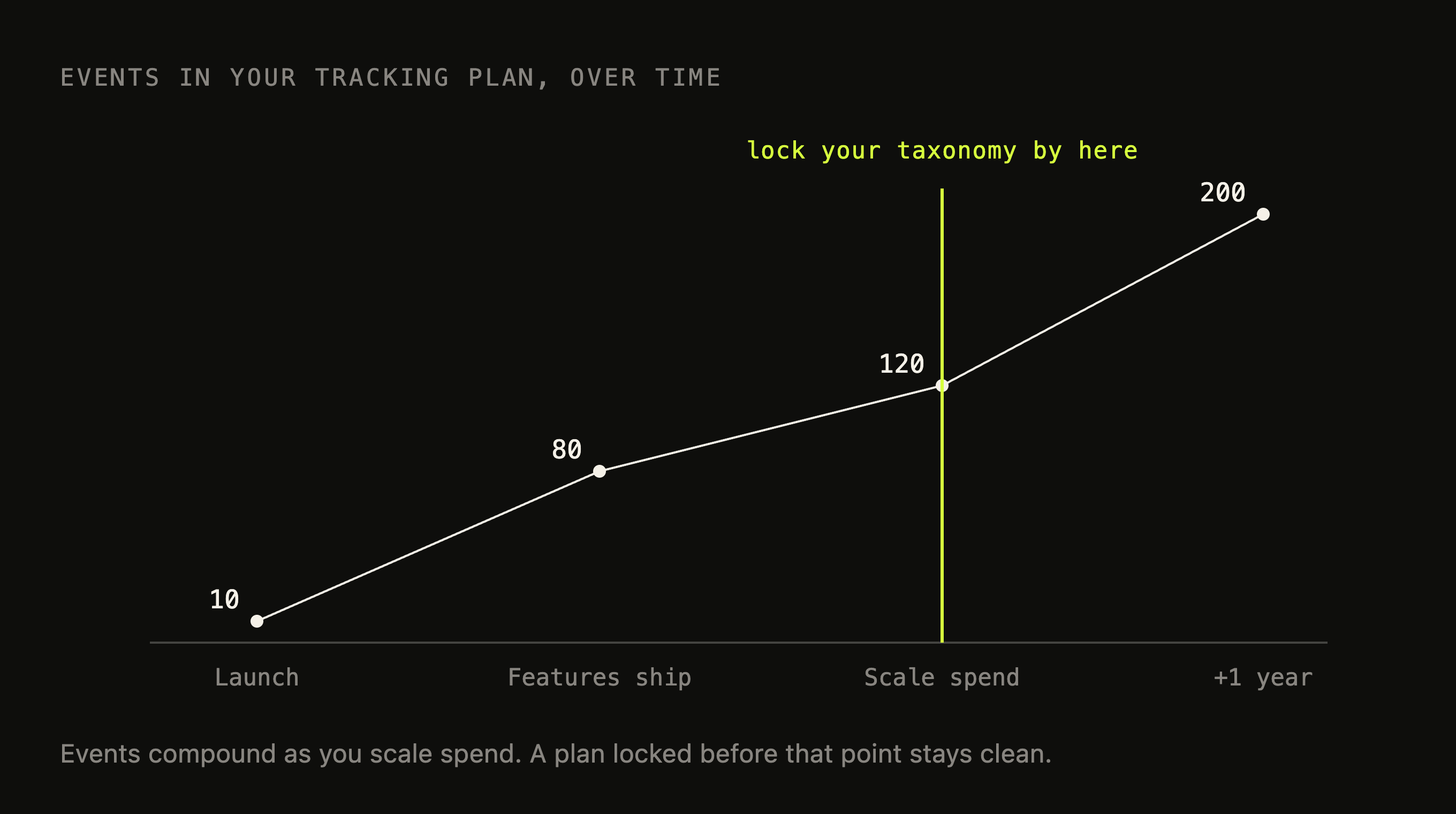
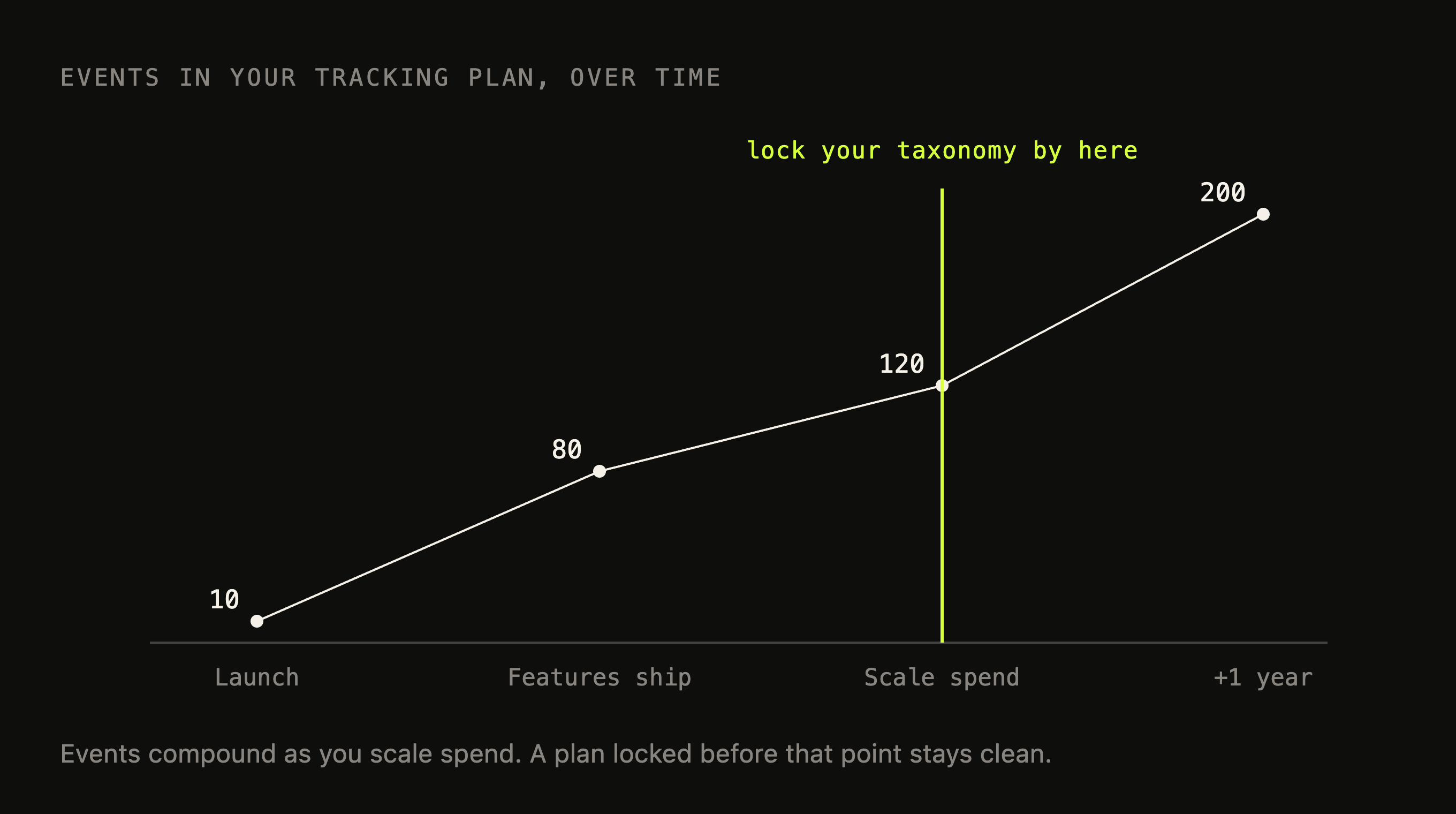
A dev fires an event every time someone asks for a number, and a year later you're sitting on 200 events, half of them the same handful of actions recorded under different names, and no clean way to answer a funnel question.
The fix is boring. Decide on 20 to 30 well-named events before you scale spend, make each one rich with properties, pick one analytics tool and one warehouse, and put an actual analytics person in charge of the schema.
Do it now and every dashboard you build later just works. Do it after you're spending ₹10L a month on ads and you're paying to retrofit decisions you already made blind.
Which events should a D2C brand actually track?
The instinct when you buy Mixpanel/Posthog/Amplitude/Clevertap/Other tools is to track everything. That instinct is the problem. You do not need 200 events. You need about 25.
Every D2C brand, whatever it sells, runs the same basic funnel, so the spine of your tracking plan is the same too. Fifteen events cover the part of the funnel that actually decides whether you make money.
Discovery
Page Viewed, fired everywhere with a property telling you which kind of pageProduct List Viewed, a category or collection pageSearch PerformedFilter Applied
Consideration
Product Viewed, a PDPProduct Added to CartProduct Removed from CartCart Viewed
Purchase
Checkout StartedPayment Info AddedCoupon AppliedOrder Completed
Account
Account CreatedLogged In
Then you add maybe ten more that are specific to how your brand works. None of these are mandatory. Each one should exist because there is a specific question you will ask of it, not because it was easy to fire.
Banner Clicked, if your homepage merchandises heavily, tells you which hero is pulling weightSuggested Product Added, the checkout upsell, tracked separately because that revenue behaves differentlyPayment Method Selected, because most Indian D2C brands want to know prepaid versus COD at the moment of purchaseSubscription Started, if you sell refills or a planBack in Stock RequestedWishlist AddedReview SubmittedAddress AddedOrder TrackedReferral Shared
Twenty-five events, give or take. That is a tracking plan you can reason about. The brands drowning in 200 are not measuring more than you. They are measuring the same fifteen things under nine different names, plus a long tail of button clicks nobody has looked at since the day they shipped.
How should you name events, and why do properties beat more events?
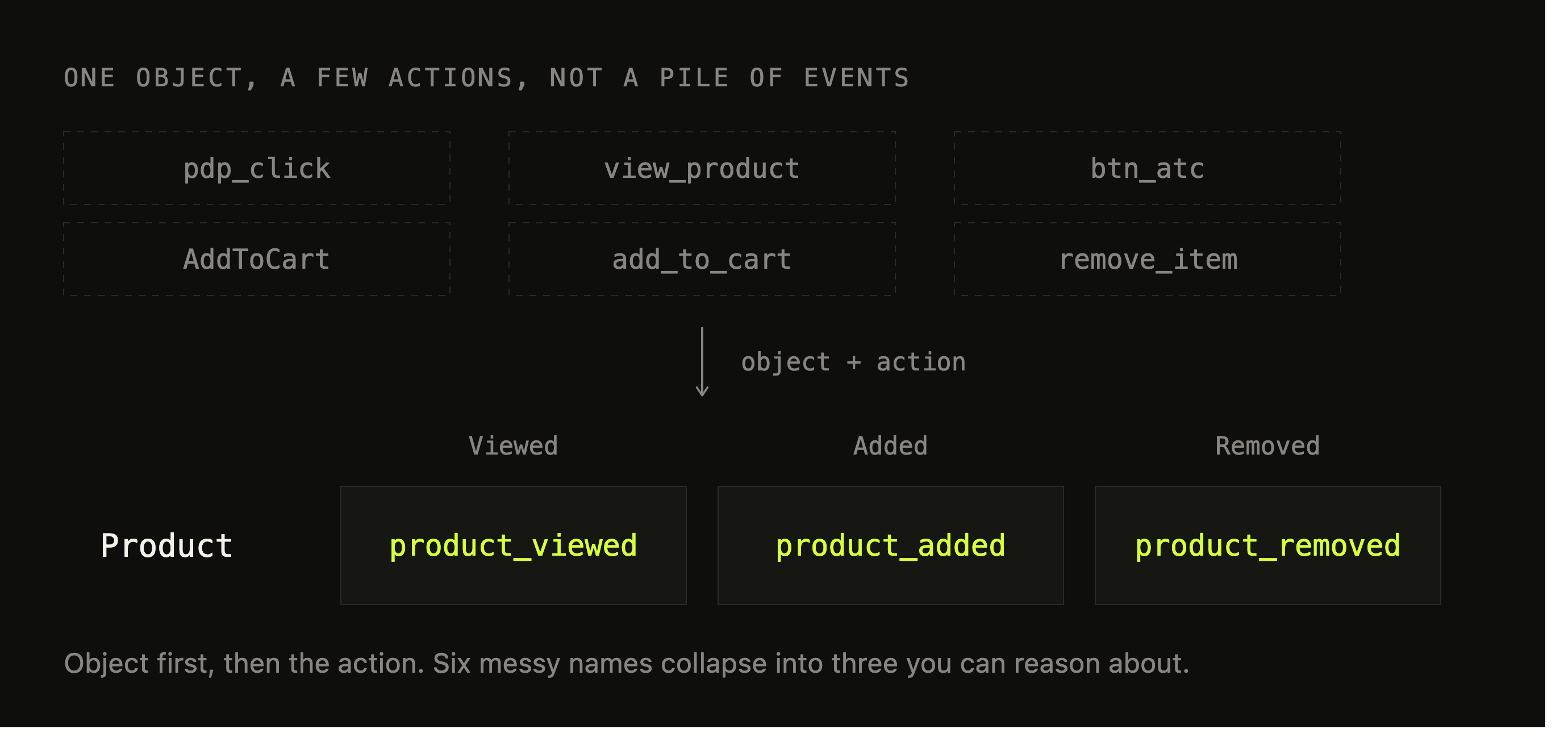
Those 200-event accounts almost never come from someone planning 200 events. They come from nobody agreeing on how to name one. The first dev who builds add-to-cart calls it add_to_cart. Six months later a different dev on a different feature ships AddToCart.
Someone instrumenting the app fires btn_atc. Now you have three events that mean the same thing, none of them talk to each other, and your add-to-cart conversion rate is wrong in three separate ways.
Pick a naming convention and write it down on day one. The one I use is object then action, in past tense:
- Object first.
Product Viewed,Order Completed,Checkout Started, so everything about products sorts together and everything about orders sorts together, and the list stays readable as it grows. - Past tense. An event is a thing that already happened.
- One casing, never mixed. Title Case or snake_case, pick one. The day
product_viewedandProduct Viewedsit next to each other in your event list is the day the plan started rotting.
The exact convention matters less than the fact that there is one and everyone follows it.
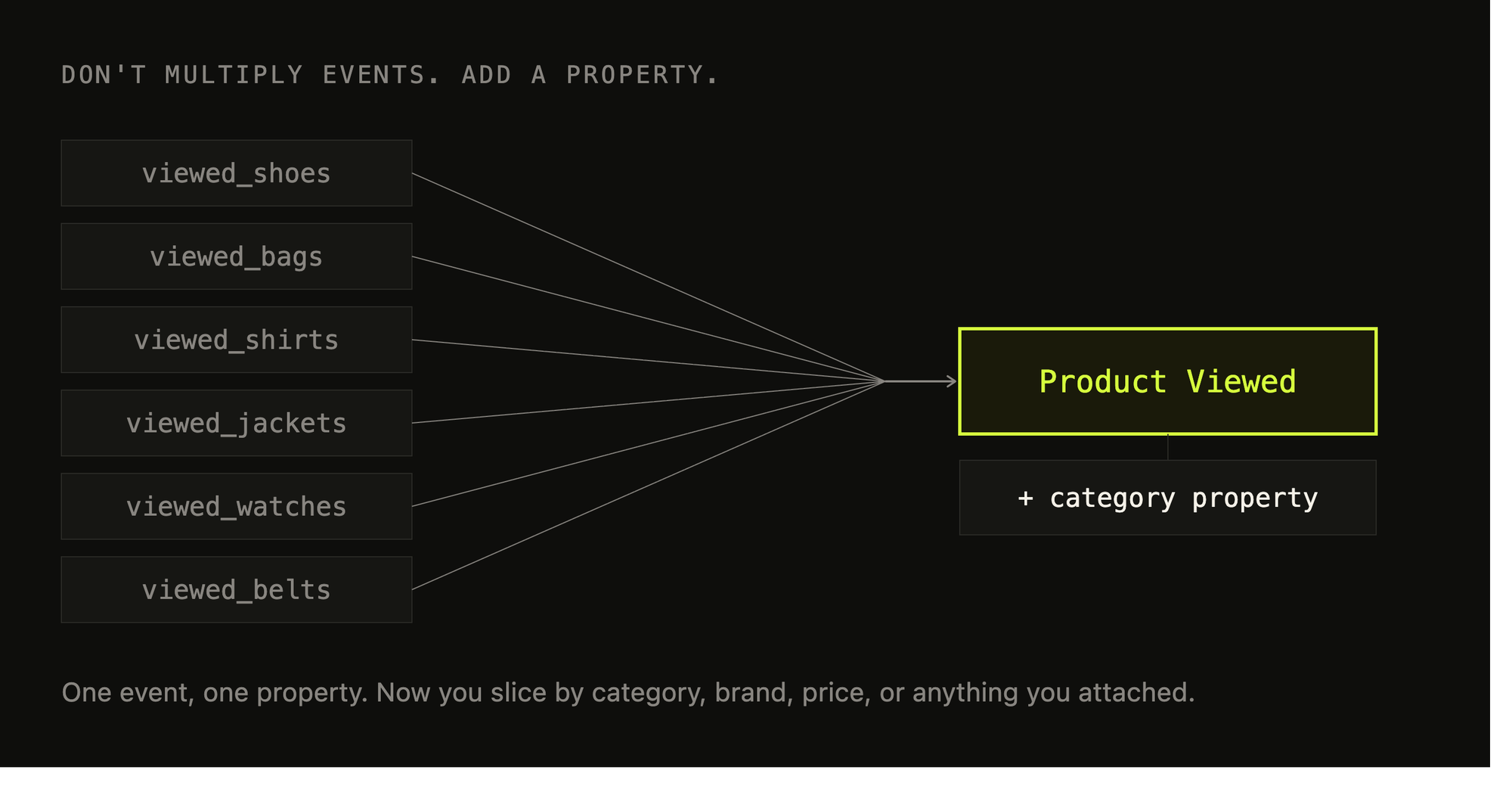
The bigger mistake is multiplying events when you should be adding properties. A brand wants to know which categories people browse, so they create Viewed Shoes, Viewed Bags, Viewed Shirts, Viewed Jackets. Add a few more categories and a couple of subcategories and you have invented forty events that are all the same event.
The right shape is one Product Viewed event with a category property. Now you have one event, and you can break it down by category, by brand, by price band, by whether the item was in stock, by anything you remembered to attach.
The event is the verb. Everything you will later want to slice by is a property.
This is also where most tracking plans are too thin. A Product Viewed event carrying nothing but a product ID is almost useless six months later when you want to know whether discounted products convert better. The events you will be glad you instrumented are the rich ones:
Order Completed: revenue, number of items, payment method, coupon used and which one, shipping city, whether it was the customer's first orderProduct Viewed: price, category, brand, discount, and where in the list it sat when they clicked
You are not just recording that something happened. You are recording enough about it to answer a question you have not thought of yet.
Name for the question, not the button. Nobody will ever ask you how many times the green checkout button was clicked. They will ask what percentage of people who started checkout finished, and whether that number is worse for COD. Instrument the second thing.
What tools do you need? One analytics tool, one warehouse
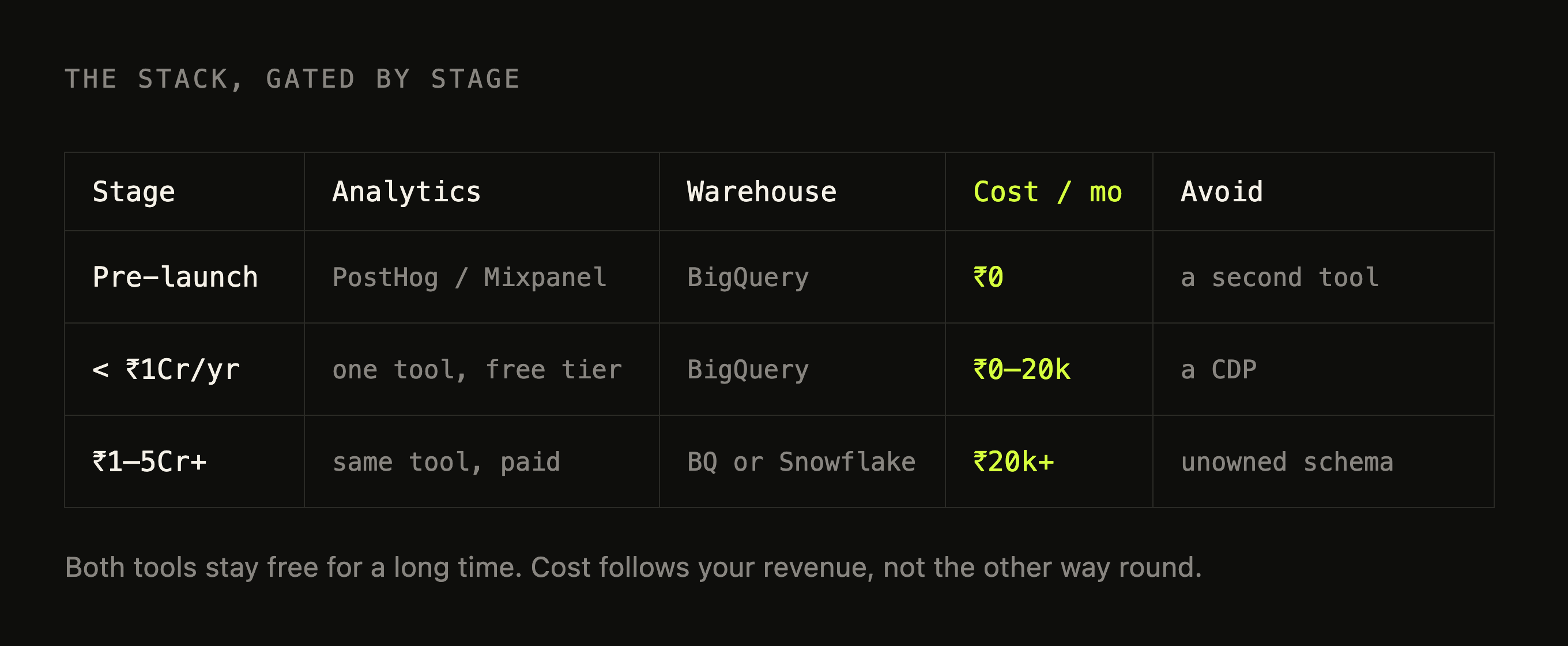
Once your events are designed, you need somewhere to send them, and this is where founders overthink it. You need two things. One product analytics tool, and one data warehouse. That is the whole stack for a long time.
For product analytics, pick one of Mixpanel, PostHog, or Amplitude. Not two. Running two analytics tools in parallel is how you end up with two sources of truth that disagree, which is the exact problem you are trying to avoid.
I have a complicated relationship with PostHog and I still recommend it to most founders. The pure analytics in Mixpanel and Amplitude is better, genuinely. The funnels and retention reports are cleaner and the interface is friendlier to a non-technical PM. But PostHog does far more in one place: product analytics, workflows, integrations, and a built-in data warehouse, all under one roof.
Founders want fewer tools and all their data in one place, and PostHog delivers on both. If your priority is the nicest possible pure-analytics experience for a product team, and you do not mind running a separate warehouse from day one, Mixpanel is the cleaner pick. Amplitude sits close to Mixpanel and is worth a look.
At your stage this is close to free. Mixpanel gives you the first 1M events a month free, then charges per event after that. PostHog gives you the first 1M events a month free too, and most of their customers never pay anything.
Amplitude's free tier covers early traffic as well. All three also run startup programs that hand you a year of the paid plan for free if you qualify, so check those before you put a card down.
The warehouse is the part founders skip, and it is the part that matters most for everything in this series after this playbook.
Your product analytics tool is for exploring behaviour. The warehouse is where all your data goes to live together: your website events, your Shopify orders, your ad spend from Meta and Google, your payment gateway data, and later your Blinkit and Swiggy numbers.
You cannot answer a question that spans two of those sources inside Mixpanel. You can in a warehouse. Use BigQuery to start. It has a free tier of 10GB of storage and 1TB of queries a month that resets every month forever, which means a brand doing under ₹1Cr a year pays close to nothing, and it stays cheap well past that.
Snowflake is excellent and plenty of larger brands run on it, but it has no permanent free tier, so for a seed-stage brand BigQuery is the cheaper default.
PostHog is the one tool that blurs this line, and it is a real advantage. It ships with a built-in data warehouse. You can connect Shopify, Stripe, your Postgres database, and a few dozen other sources, and join them to your product events in SQL without standing up a separate warehouse first.
For an early brand that is genuinely enough to stitch your store, your payments, and your behaviour into one place and start asking real questions. Where it stops is worth knowing. PostHog's warehouse is built around events, it has no semantic layer to enforce one definition of a metric across the company, its data modelling is limited, and its own team will tell you the analyst-grade parts are not quite ready.
So it carries you a long way at the start, and when your analysis gets complex enough, or you need governed revenue reporting that finance actually trusts, you graduate to BigQuery or Snowflake. That is not a knock on PostHog. It is knowing which tool to reach for when.
Put together, none of this should cost a startup doing up to ₹1Cr a year more than ₹10,000 to ₹20,000 a month, and at the very start it is closer to free. What eventually moves the number is not your revenue, it is your event volume, plus the things you bolt on: managed pipelines to pull data in, session replay on every visit, paid warehouse usage once you outgrow the free tier.
For a typical D2C brand that crossover lands somewhere around the ₹1Cr mark. Past that the spend grows, but by then you have the revenue to justify it.
Who should own the tracking plan?
None of this survives contact with a growing team unless one person owns it. This is the part most brands get wrong, and it is the cheapest to fix.
A tracking plan with no owner becomes a 200-event tracking plan. Not because anyone is careless, but because the incentives all point that way.
A dev under deadline needs to ship a feature and fire an event, and the fastest path is to invent a new event rather than check whether a suitable one already exists. A growth person wants a number by Friday and asks for a quick event to be added. Every individual decision is reasonable. The sum of them is chaos. The only thing that stops it is a single person whose job is to say no.
That person should be your analytics owner, not whichever engineer happens to be free that sprint. They hold the tracking plan, which is the real source of truth for what every event means and what properties it carries.
Every new event goes through them before it ships. They lock the core taxonomy before you scale spend, because adding events to a clean plan is easy and cleaning up a messy one after the fact is a project nobody wants to fund.
The difference between a tracking plan that still makes sense in a year and one that rotted in three months is almost always whether one named person was responsible for it.
What should you do Monday?
Start here.
1/ Export your current event list. Count how many events you have, and more usefully, how many of them are the same thing under different names. The number will be worse than you expect, and that is the point.
2/ Write your core taxonomy. Twenty to thirty events in object-action form, each with the handful of properties you will actually slice by. This is a half-day of work and it is the highest-leverage half-day in your analytics.
3/ Pick one product analytics tool and one warehouse. PostHog if you want the most in one place, Mixpanel if you want the cleanest pure analytics. BigQuery to start, on the free tier.
4/ Give it an owner. One analytics person, named, whose job includes keeping the plan clean and gatekeeping new events.
Do these four things before you turn on serious paid spend, and every analysis in the rest of this series has something solid to stand on.
Here is what comes next. Your events are clean and your tool is picked, but your data still lives in three different places: your own website, Blinkit, and Swiggy. None of them talk to each other, and each tells you a different, partial story about the same customer. Stitching those into one view is the next playbook.
Frequently asked questions
How many events should a D2C brand track?
20 to 30 well-named events, decided before you scale spend. Fifteen cover the core funnel for almost any D2C brand. The 200-event accounts I audit didn't come from someone planning 200 events — they came from nobody agreeing on how to name one.
Why is tracking too much worse than tracking too little?
Because a dev fires a new event every time someone asks for a number, and a year later half of them are the same handful of actions recorded three different ways. You don't get more insight, you get three add-to-cart numbers that don't agree.
What naming convention should you use?
Object then action, in past tense — Product Viewed, Order Completed. Write it down on day one. Without it you get add_to_cart, AddToCart and btn_atc all meaning the same thing, none of them talking to each other.
Should you add a property or a new event?
A property, nearly always. Similar actions belong in one event distinguished by a property; only genuinely different actions deserve their own event. This is the single decision that keeps a plan at 25 events instead of 200.
Can you run two product analytics tools?
Don't. Running Mixpanel and Amplitude in parallel is how you end up with two sources of truth that disagree. Pick one of Mixpanel, PostHog or Amplitude, plus one warehouse.
Which analytics tool should a D2C brand pick?
PostHog for most founders, despite the pure analytics in Mixpanel and Amplitude being genuinely better — because it bundles the warehouse and the rest of the stack. If you already have a warehouse, or you want the deepest product analytics and nothing else, pick Mixpanel or Amplitude.
Get new posts by email
Simplifying analytics for Founders and PMs. One email when a post goes out.