Creating an Event tracking plan for your product
An Event tracking plan is a structured document that lists down all the user interactions that need to be tracked, along with the data to be sent with each interaction.
The short version: An event tracking plan is a structured document listing every user interaction you'll track and the properties sent with each. Scope it deliberately rather than tracking everything, pick one naming convention and casing, group similar actions into one event with a property, and write it down before any code gets shipped.
An Event tracking plan is a structured document that lists down all the user interactions that need to be tracked, along with the data to be sent with each interaction.
Related: how to create a tracking plan, step by step and the free event tracking plan generator.
In Mixpanel, user interactions are called events, & data sent with them are called properties.
Follow the steps below to create a great tracking plan.
How much detail should you track?
Resist the urge to track everything. Instead, consider what data will inform your analysis and decision-making processes.
You can always expand your tracking later based on specific needs.
Example
For a one-page form submission, you might initially track the "Submit form" action. If you notice significant drop-offs, you can later capture more granular interactions, like field entries.
How should you name events?
Decide whether your event naming will focus on actions (e.g., "clicking on sign up button") or outcomes (e.g., "landed on sign up page").
Consistency in naming and casing (like camelCase) is key to maintaining clarity and usability in your data.
Should you add an event or a property?
Your event structure should simplify, not complicate, your data analysis. Avoid creating multiple events for similar actions. Instead, use a single event with properties to differentiate actions, and vice-versa.
To give you an example:
- For an e-commerce app, track "view product" with properties indicating which product was viewed, rather than separate events for each product viewed.
- For a SaaS with distinct features, use separate events for each feature to capture detailed usage data, rather than a single event for all features.
In summary, if the actions can be classified under a single bucket, send a single event. Else, use multiple events.
How do you draft the tracking plan?
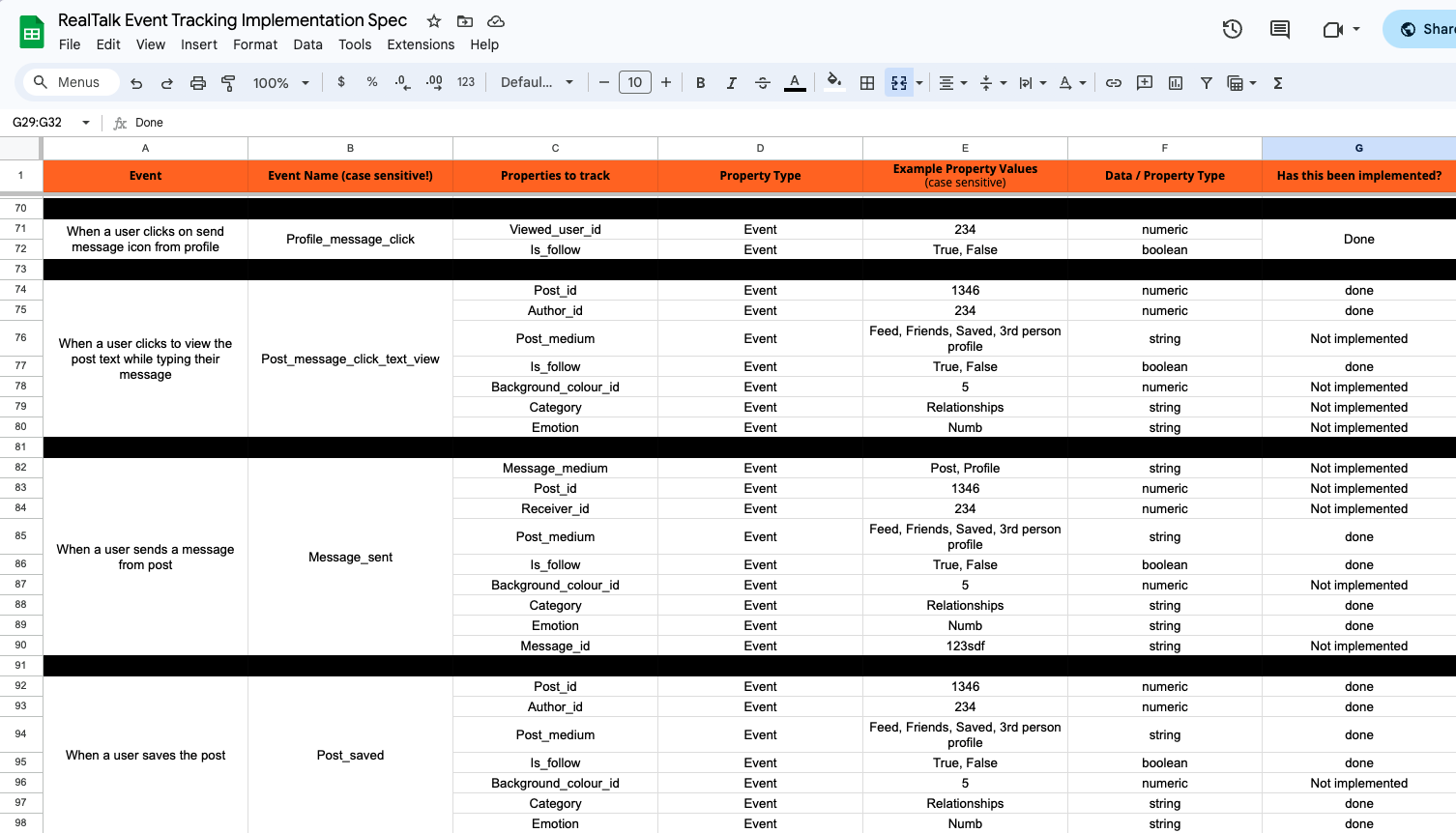
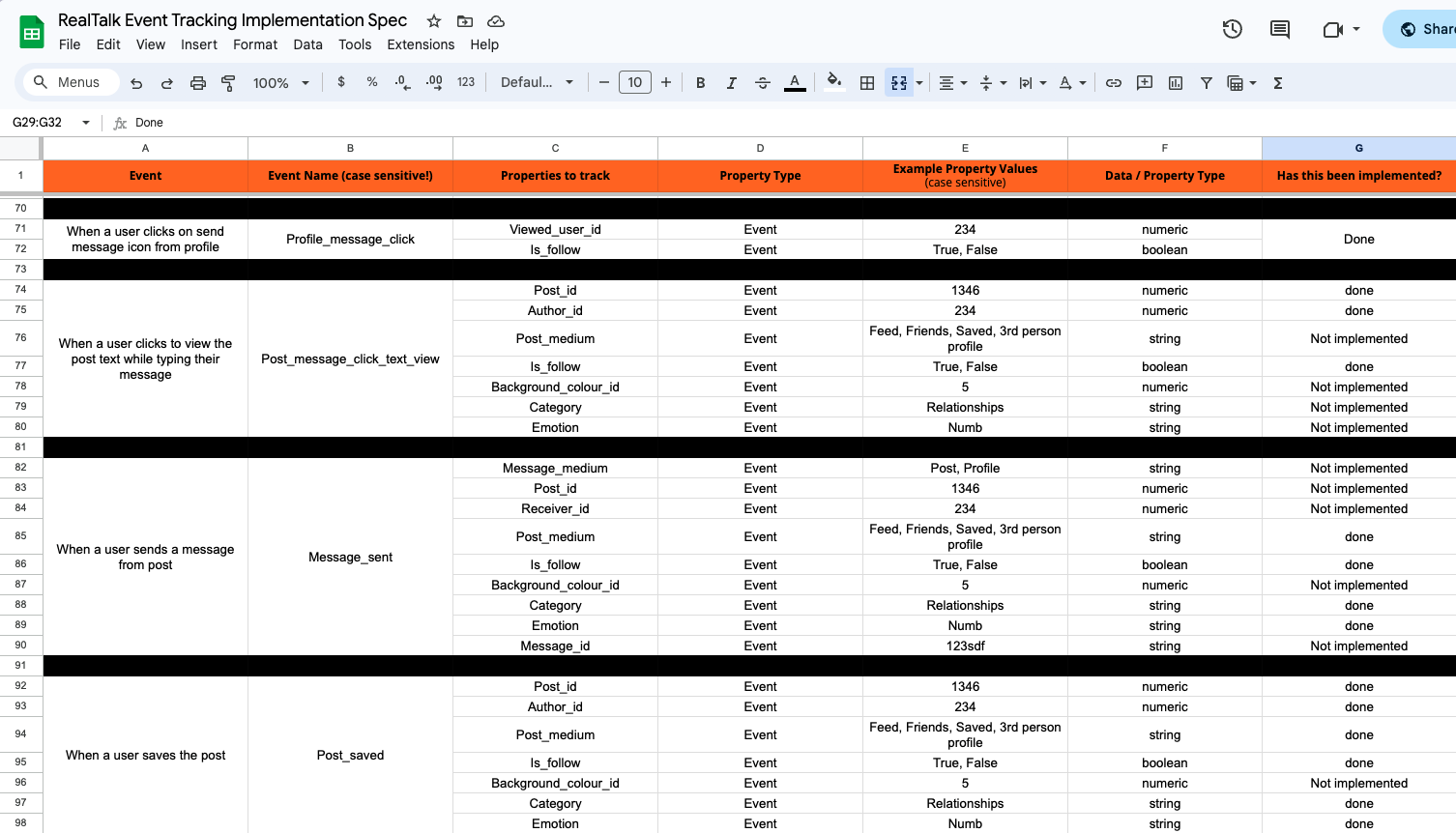
A well-designed tracking plan outlines what to track and the data to collect. Here’s how to organize your plan:
- Event Trigger: Describe when the event should fire, such as "When a user completes their sign up."
- Event Name: Specify the event name, like "Sign_up completed."
- Properties/Data: List the data to accompany the event, such as user email and sign-up method.
- Property Type: Identify if it’s an event, super, or profile property. Read more about it here.
- Example Values: Provide examples for clarity, aiding implementation.
- Data Type: Denote the type of data for each property, such as strings for emails and sign-up methods.
Check out this sample tracking plan to see a practical application of the above.
What makes a tracking plan hold up over time?
- Utilize super and profile properties to enrich your data.
- Prioritize events that provide actionable insights, avoiding excessive granularity.
- Organize your tracking plan to mirror your product's flow for easier implementation and analysis.
- Ensure event descriptions are clear and concise.
- Maintain consistency in naming conventions.
Refer here to read about all the steps involved in a Mixpanel setup.
Hope this was helpful. If you’re looking for any help on the mixpanel setup, feel free to reach out using any of the below methods.
LinkedIn | Email - anshdoesanalytics@gmail.com | Book a slot on my calendar
Frequently asked questions
What is an event tracking plan?
A structured document listing all the user interactions to be tracked, along with the data sent with each one. In Mixpanel those interactions are events and that data is properties.
Should you track everything?
No. Resist the urge. Track what will inform your analysis and decisions — you can always expand later based on a specific need, and it's far cheaper than untangling a plan nobody scoped.
Should event names describe actions or outcomes?
Either works, as long as you pick one and stay with it. "Clicking on sign up button" is action-based; "landed on sign up page" is outcome-based. Consistency in naming and casing is what keeps the data usable.
When should similar actions share one event?
Whenever they fall under a single bucket. Use one event with a property distinguishing them rather than separate events for each variant. Only genuinely different actions deserve their own event.
What happens if you skip the tracking plan?
Messy data, missing insight and wasted dev time. It's the step teams most often skip and the one everything downstream depends on.
Get new posts by email
Simplifying analytics for Founders and PMs. One email when a post goes out.