Product analytics by stage: what to build at your size
Sign-ups a month, not visitors, decides your analytics stage. Under 1,000 sign-ups a month, one product analytics tool on its free tier is enough. From 1,000 upward, track all the core actions in your product and use the data to find where and why people drop off.
A company doing 100 sign-ups a month asks me to build them a full Product analyticsThe analysis of what users do inside your product. The test is whether you can point at a row of data and name the user who did it.Glossary setup including BI tools and warehouses, and what not. A company doing 10,000 sign-ups a month is running on one basic tool, or nothing at all. I see both.
So let me talk about what not to build yet, and what actually makes sense at your stage.
What analytics do you need under 1,000 sign-ups a month?
You need a very basic setup. Pick any product analytics tool, Mixpanel, PostHog, or Amplitude, and use the free tier.
At this volume you're nowhere near the event limits. Mixpanel and PostHog both give you 1M events a month free, Amplitude gives you 2M. What you'll actually run into is the saved report cap, 5 reports per user on Mixpanel's free plan and 10 charts for the whole org on Amplitude's. In such a case - opt for their growth plan, and it’ll be chargeable only after the 1Mn and 2Mn limit exhaust.
Then track the events that matter. An event is simply one action you record, like "signed up" or "completed onboarding". You want to know:
- how many people came to the website or the app
- how many people signed up
- how many people completed onboarding
- where they dropped off
- what feature they used
- whether they came back
Some of these take a few events each. Onboarding, for example, has several steps, and you want to see which step people leave on.
At this size you shouldn't be tracking more than 10 to 15 events. Those 15 events will give you a very clear idea of what your core metrics are.
This is also not the stage to go deep on those drop-offs. You don't need to work out from the data why people are leaving, or run a lot of experiments off the back of it. You use analytics here for two things: to understand where you stand, and to check whether the changes you're making actually move your metrics.
Building the full setup anyway is not recommended. You spend weeks instrumenting events nobody will use. Then you start making decisions off samples too small to mean anything. A handful of extra drop-offs in a week looks like a reason to rebuild onboarding, when it's just noise. And that's time you weren't spending talking to the people who left.
Your most useful tools at this point are session replays (recordings of real users clicking through your product) and talking to your own users. Replays are free at this size too, 5,000 recordings a month on PostHog and 10,000 sessions on Amplitude, though Amplitude only keeps them for a month. You still want a good analytics setup so you can see what's going on and occasionally dig into something.
But your focus shouldn't be on becoming really data-driven, with a full-time data person on the team living inside your numbers. At this size that won't give you much back.
What analytics do you need between 1,000 and 20,000 sign-ups a month?
This is usually the point where you need a solid analytics foundation. You've made a lot of changes by now. Your product is somewhat stable. And toward the upper end of that range you finally have enough data to run experiments and trust that the result is real, not just chance. The "Experimentation" chapter covers why that matters.
This is where you track all of the core actions on the product. When I say core actions, I don't mean every single button. I mean the important events and the important buttons a user can click, the ones where you'd want to know what people are doing.
Track those. Then use a combination of session replays, talking to users, and your data to work out:
- where people are dropping off
- why they're dropping off
- how you can improve those conversion metrics
- what to hypothesize and experiment with next
What analytics do you need above 20,000 sign-ups a month?
It's the same setup. More volume means faster answers and more experiments running at once. But nothing about what you track or how you work with it changes. Except, you might want a BI tool on top of the warehouse you added earlier.
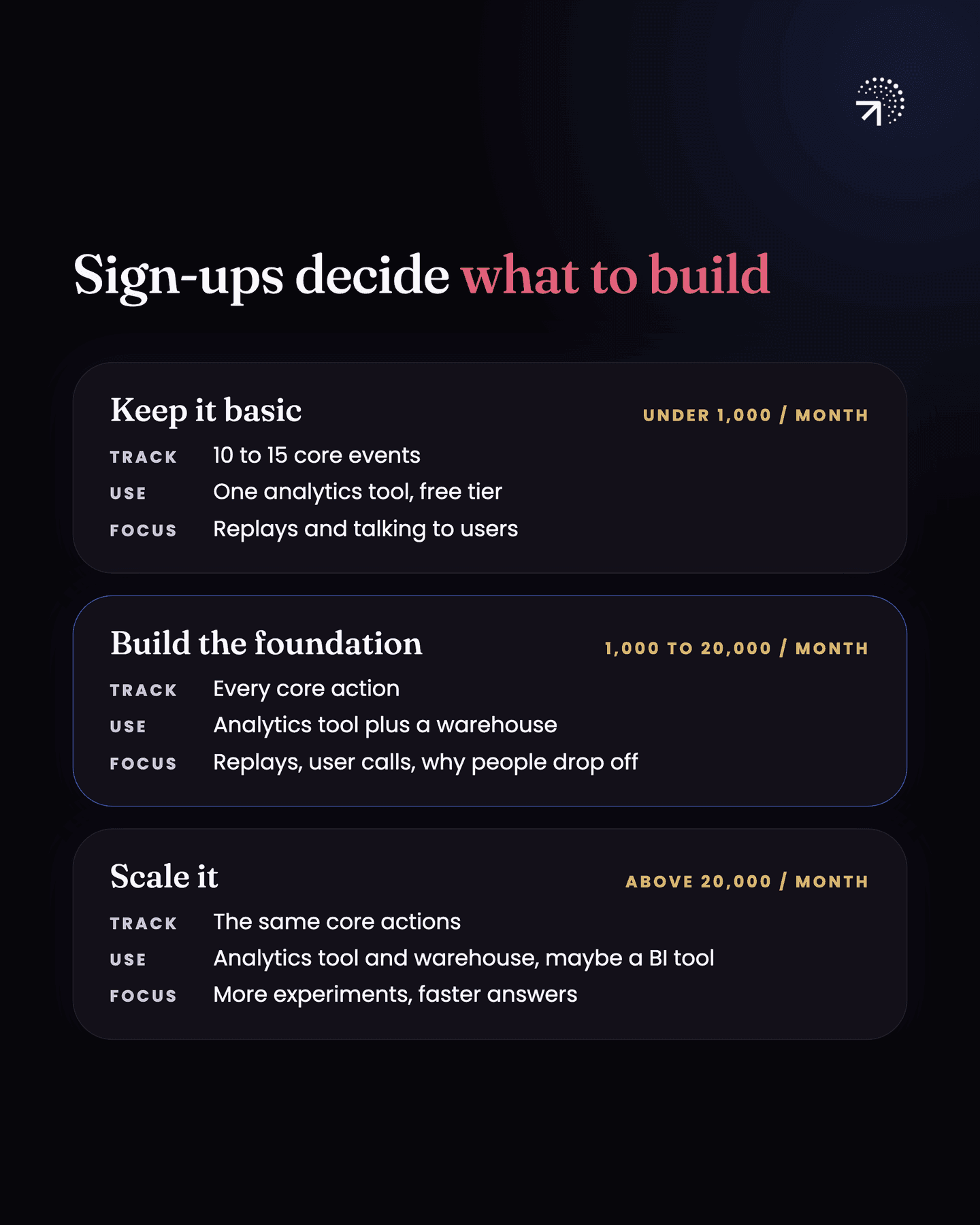
| Sign-ups a month | What to track | What to use | What analytics is for |
|---|---|---|---|
| Under 1,000 | 10 to 15 events: visits, sign-ups, onboarding steps, drop-off, features used, return visits | One product analytics tool on its free tier, session replays, and talking to users | Knowing where you stand, and checking whether your changes move your metrics |
| 1,000 to 20,000 | All the core actions: the important events and buttons | Session replays, talking to users, and your data in a warehouse | Finding where and why people drop off, and what to experiment with next |
| Above 20,000 | The same core actions | The same setup, maybe with a BI tool on top of your warehouse | Faster answers and more experiments running at once |
If you're at 20,000 sign-ups a month or more, set this up now and start using data to understand how people actually use your product. The chapter on creating a Tracking planOne sheet listing every event you track, when it fires and the properties it carries. Written before implementation, owned by someone who is not a developer.Glossary walks you through deciding exactly which events to track.
Common questions
When do you need a data warehouse?
Around 1,000 sign-ups a month. Below that, one product analytics tool on a free plan covers what you need. A warehouse earns its place when you have several sources that need to line up in one place.
Is the free plan on Mixpanel or PostHog enough?
For most companies under 1,000 sign-ups a month, yes. Mixpanel and PostHog both include 1M events a month free and Amplitude 2M. What you hit first is the saved report cap, not the event limit.
How many events should you track under 1,000 sign-ups a month?
No more than 10 to 15: how many people came to the website or app, signed up and completed onboarding, where they dropped off, which features they used and whether they came back.
What should you track between 1,000 and 20,000 sign-ups a month?
All of the core actions in the product. That means the important events and the important buttons a user can click, the ones where you'd want to know what people are doing, not every single button.