MMP vs UTM tracking: knowing where users came from
If your product is web only, UTM tags on every link are enough. The moment you have a mobile app, UTMs break at the install and you need an MMP. If you have both a website and an app, use the MMP for every link, so one system tells you where each user came from.
You have ads running, links going out in a dozen places, and no reliable answer to a simple question: where did this user actually come from? The numbers get complicated, inaccurate, and confusing, and most Founders end up not knowing what to do about it.
There are two systems that solve this. Which one you need depends on whether you have a website, an app, or both. They work differently enough that it is worth covering them separately.
UTM tags on every link, plus the auto-tracking your analytics tool already does. In most cases you do not need an MMP at all.
UTMs stop working at the install, so you need an MMP to attribute it.
Both systems, and the work is making them agree on the same user.
When is UTM tracking enough?
If your product lives on the web and you do not have a mobile app, in most cases you do not need an MMP at all. UTMTags added to the end of a link that record where a click came from. Enough on their own for a web-only product, and useless the moment an app install sits in the path.Glossary on its own will do the job.
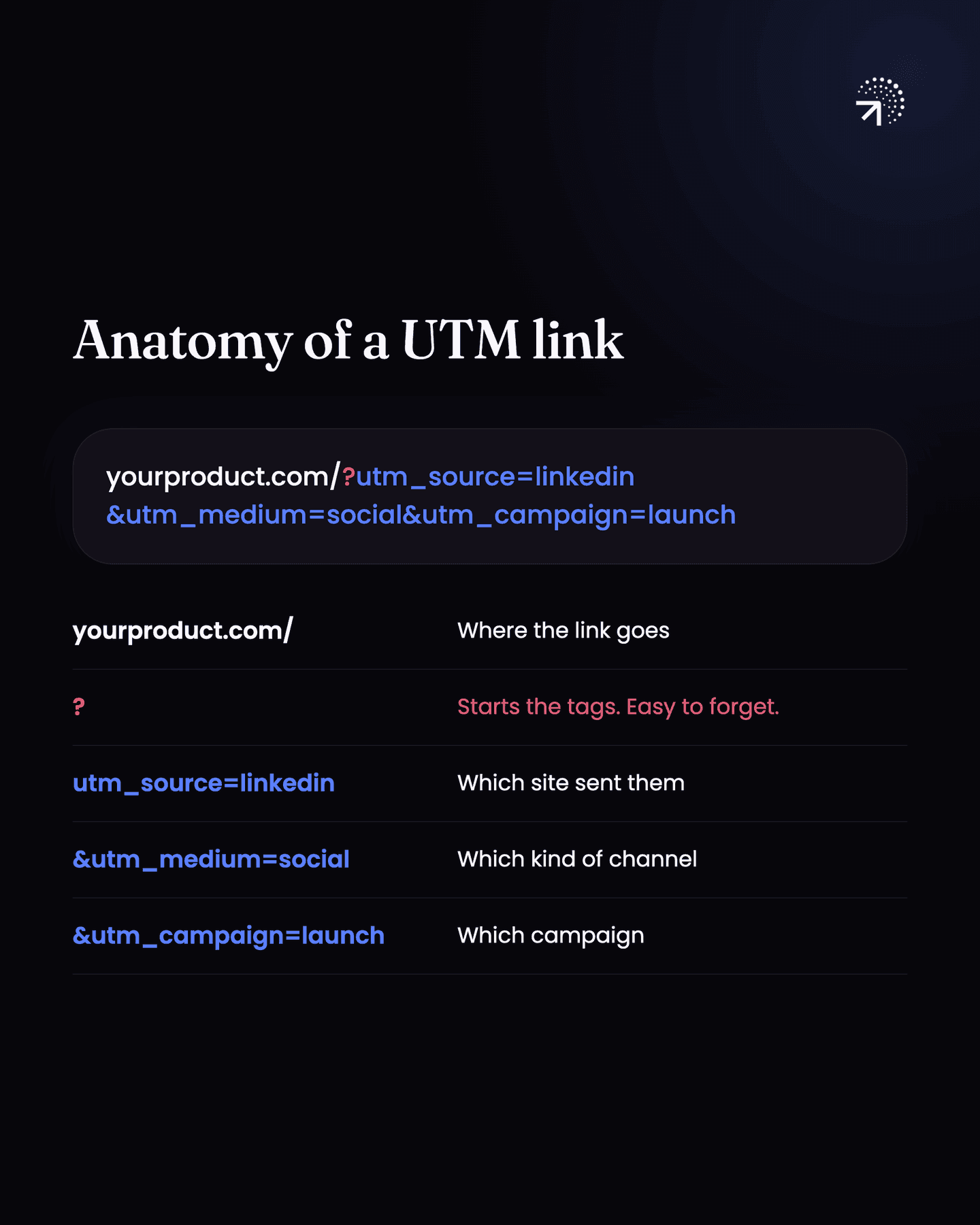
UTMs are small tags you add to the end of a link that say where the click came from: which site, which kind of channel, which campaign.
It works because your Product analyticsThe analysis of what users do inside your product. The test is whether you can point at a row of data and name the user who did it.Glossary tool does the hard part for you. When a user lands, these tools read the UTM tags off the URL and save them as properties on that user automatically. There is nothing for you to build.
So there are only two things to get right.
First, every link to your product anywhere on the internet needs a clear UTM structure. Your link on LinkedIn, your link on Instagram, the blogs you publish, the guest posts on third party sites that point back to your product. If you do not have that, you will keep struggling with this no matter what else you fix.
Second, turn on pageview auto-track. That is the setting in your analytics tool that records every page view without your engineer adding code for each page. Every page a user lands on through a UTM link gets captured with the full URL, and the values also show up as separate properties: utm_source, utm_medium, utm_campaign, and the rest.
Here’s how a link with UTMs looks like: yourproduct.com/?utm_source=linkedin&utm_medium=social&utm_campaign=launch
Why doesn't UTM tracking work for a mobile app?
The moment you have an app, UTM tracking stops being enough and an MMPA mobile measurement partner: the service that attributes an app install to the campaign that caused it, which UTM parameters cannot do because they do not survive the app store.Glossary takes over.
MMP stands for mobile measurement partner. AppsFlyer, Branch, and Adjust are some top examples. They create links for you that hold on to the tags you attached, such as campaign and source, through the app install. That install is the exact point where everything otherwise breaks.
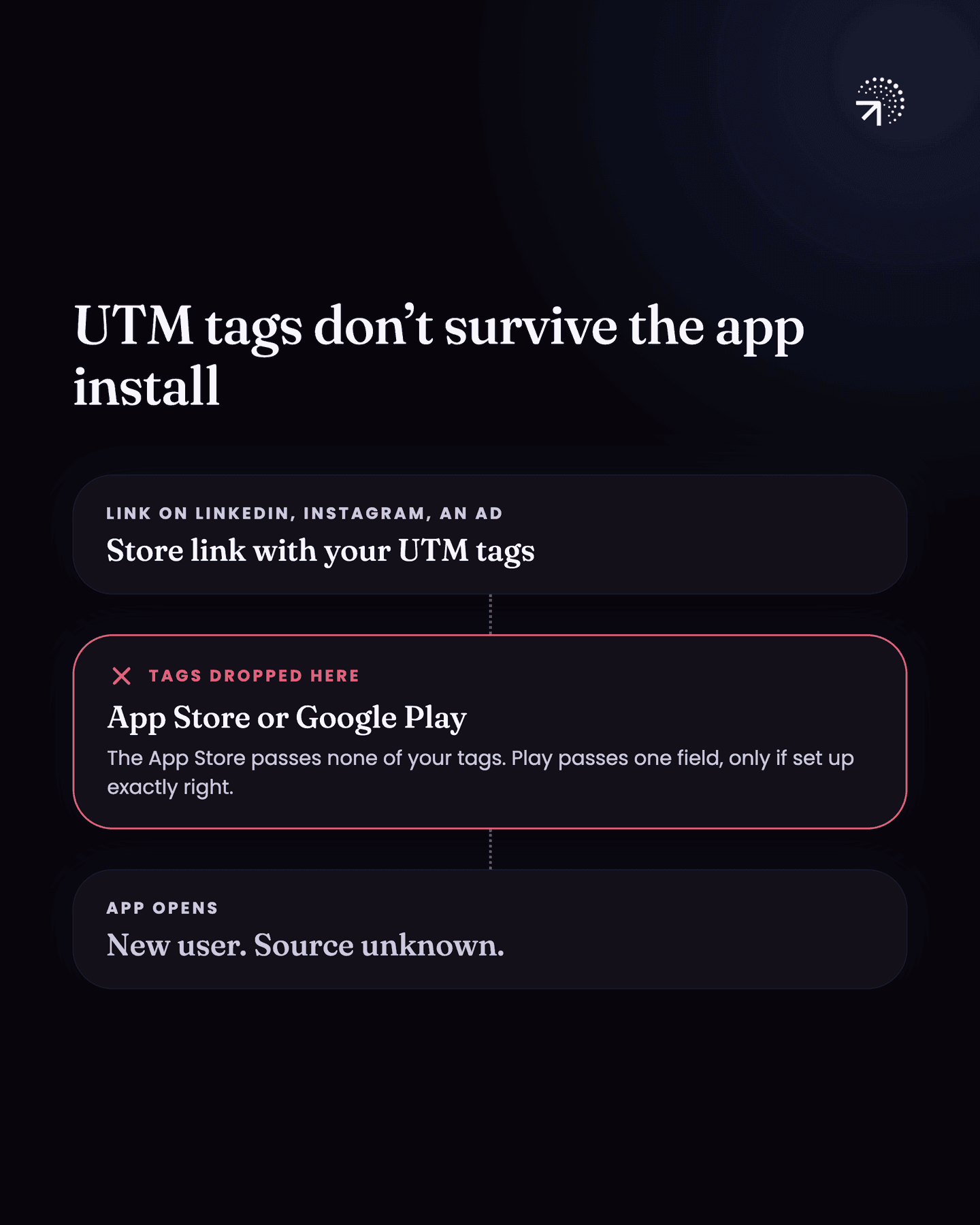
Here is the usual setup. You have your Play Store or App Store URL sitting on LinkedIn, in your Instagram bio, in a message to a user, and behind your ads pointing straight at the store. Someone taps it, installs, and opens the app. You now have a new user and no idea where they came from, because the store did not pass your tags on to the app.
Note: the App Store passes none of your tags through to your app. Google Play passes one field, called the referrer, but only if all three of these are true:
- The link is encoded correctly.
- It points straight at play.google.com
- A developer has integrated the Play Install Referrer library and written the code to read the referrer the first time the app opens.
Neither store carries your UTMs the way a website does.
An MMP link is what fixes this. You add whatever tags you need, campaign, source, anything else. When someone clicks that link to download the app, the MMP keeps all of it.
The first time the app opens, app asks the MMP which link this user installed from. You pull the tags out of the answer and send them into your product analytics tool. Now you can see that this user came from X campaign.
The whole path: click the MMP link → install → app opens → app asks the MMP which link this was → you send the tags into your analytics tool.
Two things have to be true for any of it to work.
- One, every link you have across the internet is an MMP link, not a normal Play Store or App Store URL. That includes the links inside your ad platforms.
- Two, a developer builds the whole path: the MMP SDK in the app, read which link the user installed from, pull out the tags, and send them to your analytics tool. This is real developer work, not a setting you turn on.
What happens when you have both a website and an app?
You have a decision to make before you build anything.
If you are setting up an MMP anywhere, use it everywhere. Strip out UTM tracking completely and let the MMP be the one system that generates every link you put out. Running UTMs on the web and an MMP on mobile gives you two systems and two sets of numbers that might never quite agree, and you will spend your time reconciling them instead of reading them.
What that costs you: you are now paying the MMP for your web traffic as well as your installs.
Edge case: how do you link a website visitor to their app install?
Carry the visitor's anonymous ID in the app download link. This is the setup where you have a website and an app, and the website is not the product.
People come to the website, click a link or scan a QR code, download the app, and start using it from there.
The complication is your main FunnelThe steps a user goes through in order. Every product is one, and so is every feature inside it. Counting who reaches each step is what shrinks a whole-product problem to a single step.Glossary: someone lands on the website first, then downloads the app from a button or a QR code on it.
Being able to say "this user came to the website from this source" and "this user downloaded the app from this button" are two different things. By default they do not join up.
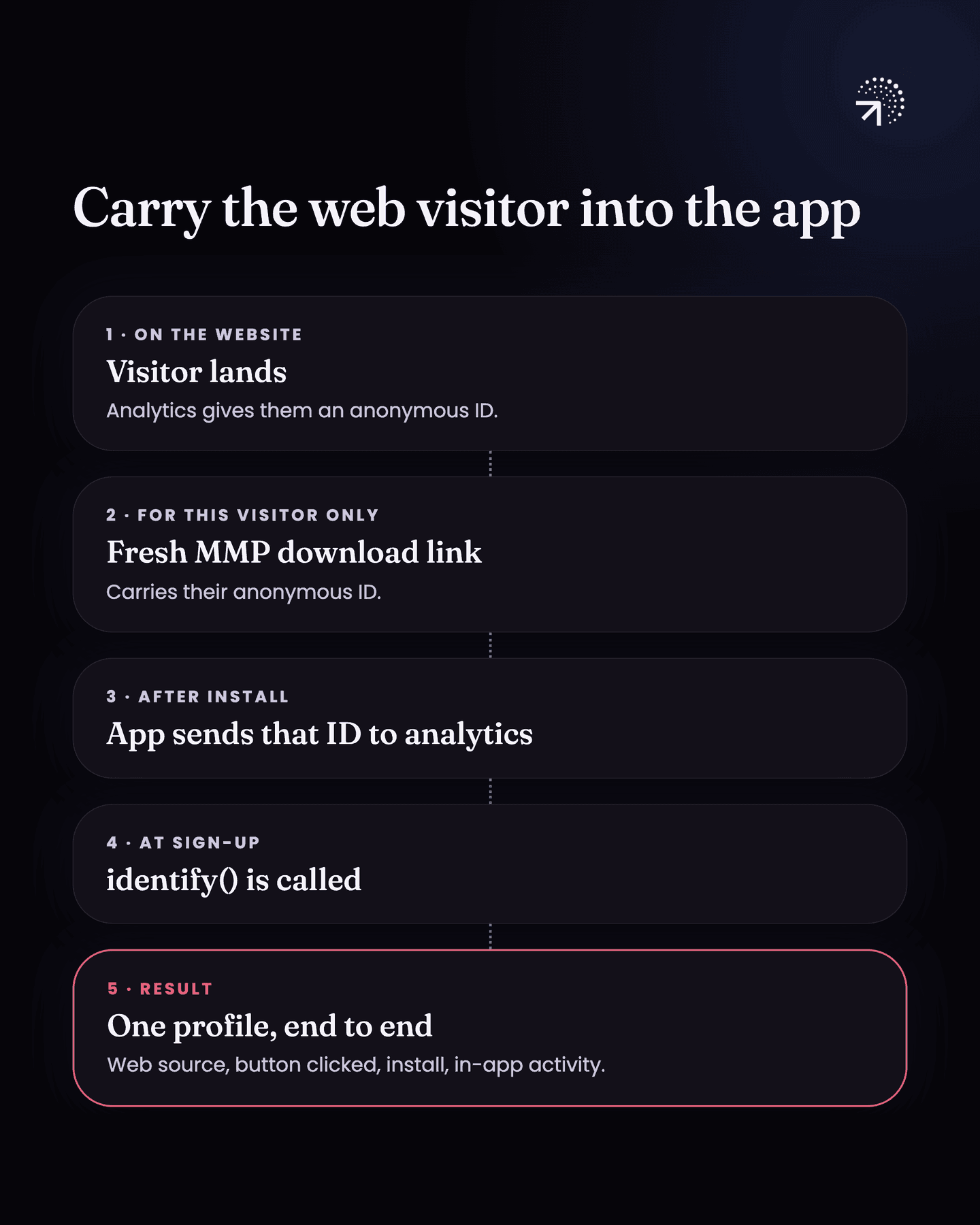
There is no signup or login on the website, so every visitor stays anonymous. Your analytics tool only knows them by an Anonymous IDThe random identifier an analytics tool gives a visitor before it knows who they are. It survives until identify runs, and everything done before that point hangs off it.Glossary it gives their browser ("Identity stitchingJoining all of one person's activity into a single profile, whatever device or browser it arrived from. Get it wrong and every per-user number is wrong in the same direction.Glossary" covers this). When that person downloads the app, they show up as a completely separate user. You cannot link them.
The way to link them is to have your MMP provider generate the download link/ QR code on the website fresh for every visitor.
That link carries one extra tag: the visitor's anonymous ID from your product analytics tool. When they click it and install the app, the app now has their real anonymous ID from the web.
As soon as the app installs, you send that ID to your product analytics tool. When they sign up, you make the identify call, which tells your analytics tool who this person is so their anonymous history joins their real account (also covered in "Identity stitching" chapter).
What that gives you is a unified user profile: one record that shows where they came to the website from, which button they clicked, that they installed the app, and what they did once they were inside it.
So for this setup, make sure of two things.
- One, every link that sends someone to your website is an MMP link, so the source that brought them in is captured by the same system that will capture the install.
- Two, every button and every QR code on the website has its own separate MMP link (generated dynamically with user’s anonymous ID from analytics tool), so you can tell which one actually drove the download.
What should you set up for MMP and UTM tracking?
It depends on whether you have a website, an app, or both.
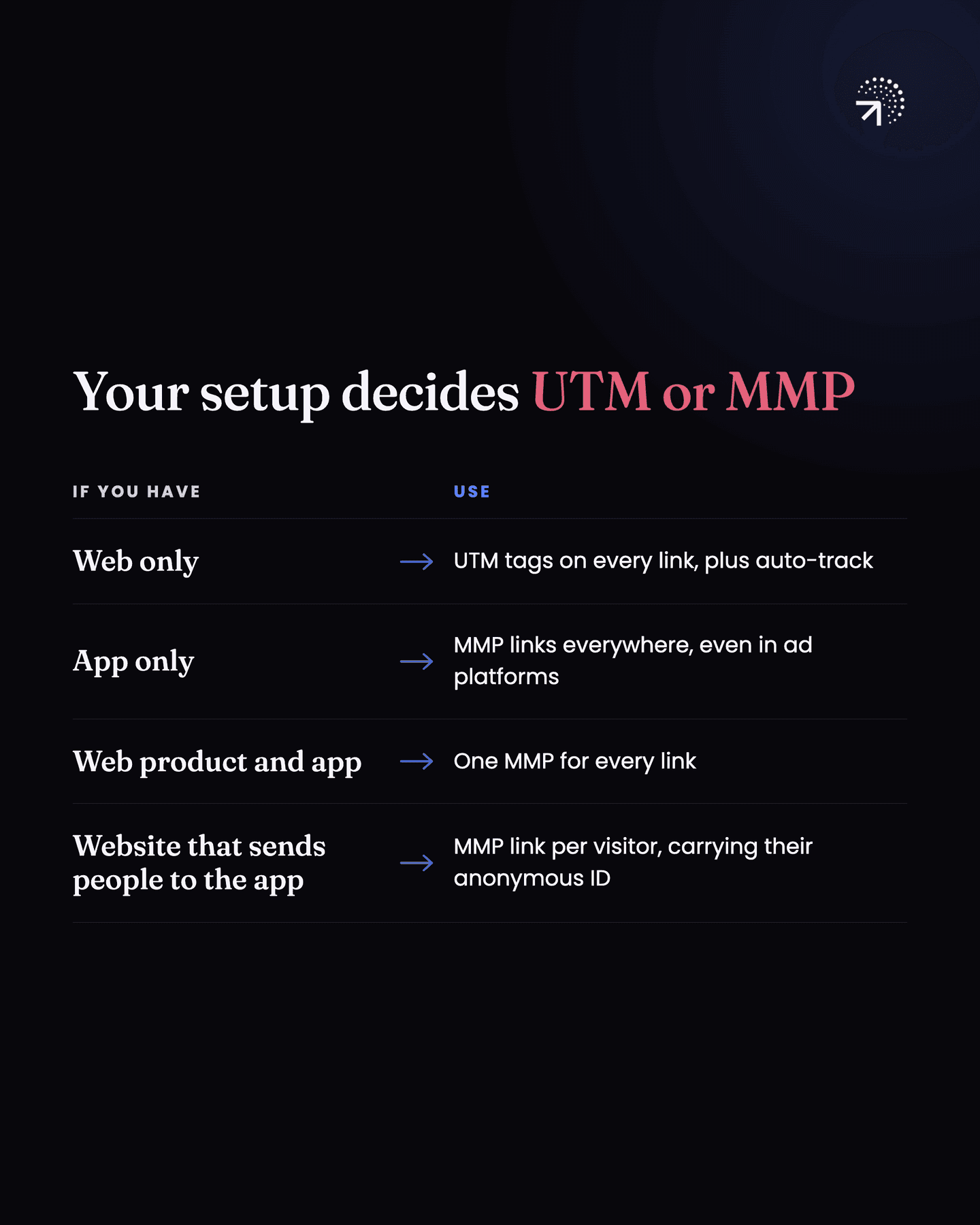
| Your setup | What to do |
|---|---|
| Web only | Consistent UTM tags on every link you put out, built with a UTM builder, and auto-track turned on |
| App only | MMP links everywhere, including inside your ad platforms, and a developer passing the install source into your analytics tool |
| Web product and app | One MMP for every link. Users join up when they log in |
| Website that sends people to the app | One MMP for every link, a fresh download link per visitor that carries their anonymous ID, the identify call at signup, and a separate MMP link for every button and QR code |
Common questions
Do I need an MMP if I have a mobile app?
Yes, in most cases. UTM parameters don't survive the trip through the app store, so the install arrives with no source attached. An MMP is what closes that gap.
Is UTM tracking enough for attribution?
For a web-only product, usually yes: UTM tags on every outgoing link plus your analytics tool's auto-tracking will tell you where users came from. It stops being enough as soon as an app install sits in the path.
What is an MMP?
A mobile measurement partner, such as AppsFlyer, Branch or Adjust. It creates links that hold on to the tags you attached, like campaign and source, through the app install, so the app can ask which link a user installed from.
Should you use UTMs and an MMP together?
If you are setting up an MMP anywhere, use it everywhere and let it generate every link you put out. Running UTMs on the web and an MMP on mobile gives you two systems and two sets of numbers that might never quite agree.