Unifying data: making your tools agree on one user
Unifying data means lining up records from different tools so they describe the same user or campaign. You join at the least detailed level both sides share. User-level sources join on your internal user ID; ad spend only goes down to campaign and day.
Unifying data can mean a few different things, so start with what you probably already have:
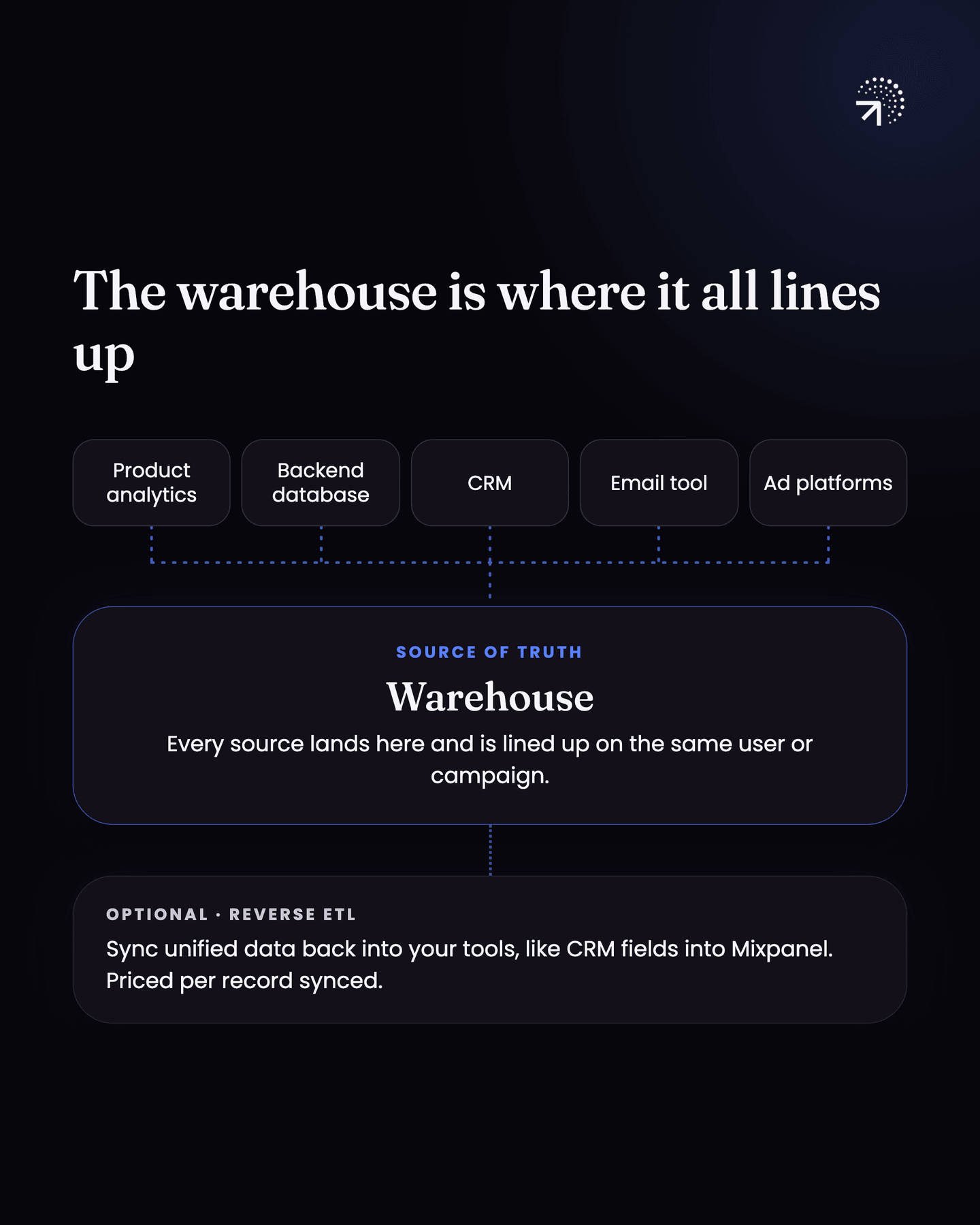
- a Data warehouseA separate database built for analysis rather than for running the product. It is where every source lands together, which is what makes it the number you trust when two tools disagree.Glossary
- a Product analyticsThe analysis of what users do inside your product. The test is whether you can point at a row of data and name the user who did it.Glossary tool
- a CRM, maybe Hubspot
- an email marketing tool like Klaviyo
- a handful of other things
And if you're running ads, you have ad data too.
Most Founders I speak with have every one of these tools installed and none of them lining up.
Where does unifying data happen?
The warehouse is where the unifying actually happens.
At what level should you join data from different tools?
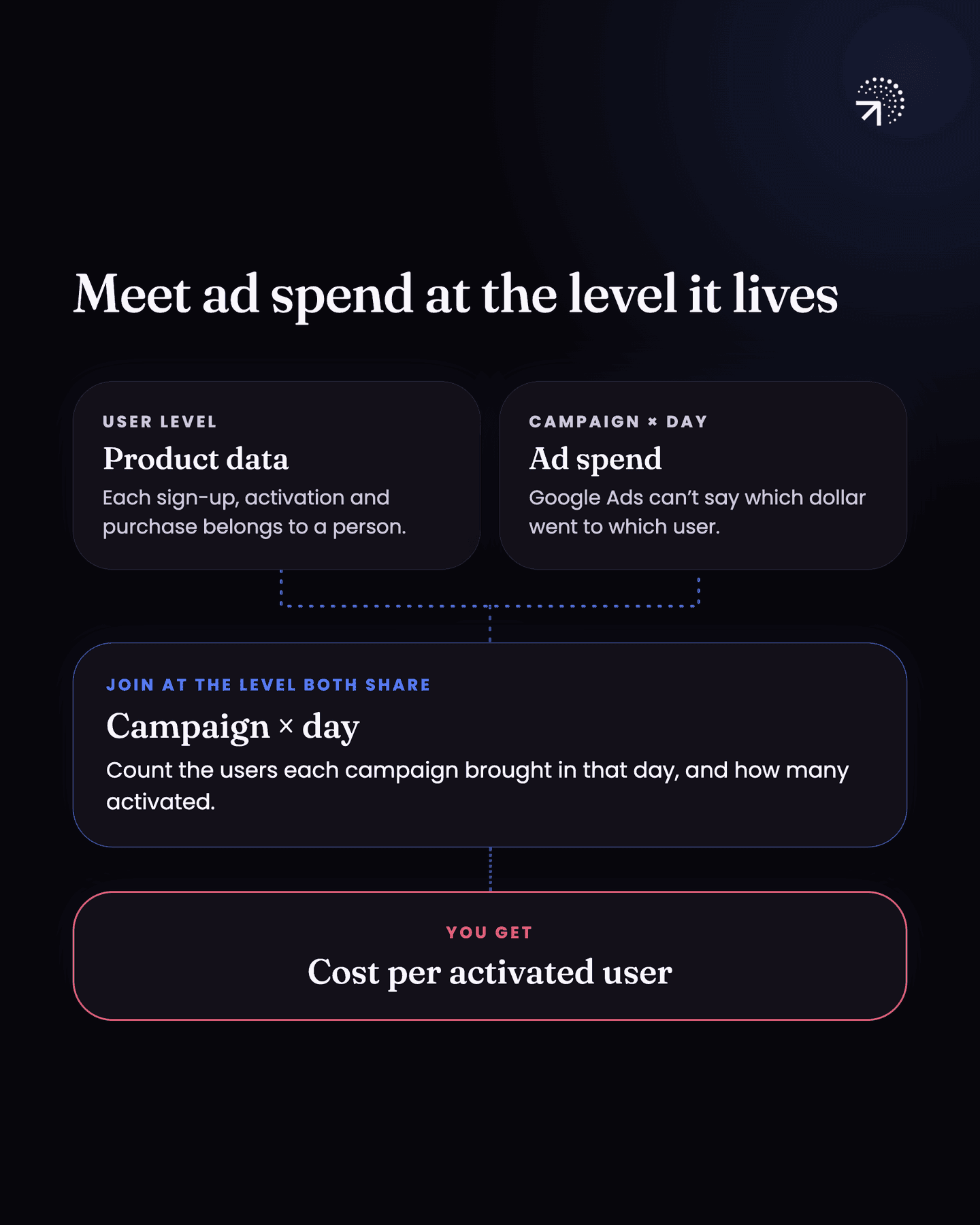
Join at the least detailed level both sides share. The level you unify on can be different, and this is the part worth getting right.
Most of your data is user level. A signup, an email open, a lead score, a purchase: all of it attaches to a person.
Ad spend doesn't. Google Ads gives you spend per campaign per day, and it can't tell you which of those dollars went to which user.
So you connect your data at the least detailed level both sides share. User level data stays user level. Ad spend only goes down to campaign and day, so that's where you join it.
| Data | Level it comes at | What you join it on |
|---|---|---|
| Signups, email opens, lead scores, purchases | User | Your internal user ID |
| Ad spend from Google Ads or Meta | Campaign per day | Campaign ID and day |
In practice: take a campaign's spend for a day, count the users who came in on it that day (through UTMs or MMPA mobile measurement partner: the service that attributes an app install to the campaign that caused it, which UTM parameters cannot do because they do not survive the app store.Glossary setup) and how many activated or stuck around, and you know what you paid per activated user.
What you're building is one user journey across every source, so you can answer things like:
- if we spend this much on this campaign, how does this campaign perform on activation and RetentionThe share of users who come back. Bounded retention counts people who returned on exactly that day; unbounded counts that day or any day after, and the two give very different numbers.Glossary?
- if one user's lead score is 8 and someone else's is 4, what actions in the product got them there?
Should you sync unified data back into your tools?
A lot of the time these data points can also be synced back into other tools, to widen what those tools can do for you. You might want a lot of your Hubspot data in Mixpanel, for example, so you can answer these questions inside Mixpanel rather than writing SQL against the warehouse every time.
Whether you sync into your tools or query in the warehouse is a product decision you have to make, and both sides cost something. Syncing means a reverse ETL tool priced per record synced, and the fields have to be kept in step as your schema changes. Querying in the warehouse costs you nothing extra in tooling, but every question goes through someone who can write SQL, so you're paying in that person's time and in how long people wait for answers.
In an ideal setup you have a warehouse with all your data unified and proper models built on top of it. Models are the cleaned-up tables your team actually queries, covered in Data modelling.
How do you make your ad platform data match your product analytics data?
People really struggle with this one, and it's very simple.
Every tracking template (the extra text your ad platform adds to the end of the link) should have a utm_campaign parameter, the tag that tells your analytics tool which campaign a click came from (covered in MMP and UTMTags added to the end of a link that record where a click came from. Enough on their own for a web-only product, and useless the moment an app install sits in the path.Glossary). That parameter should contain your campaign ID.
You don't type the ID in by hand. Every platform has a macro, a placeholder it swaps for the real value at click time:
- In Google Ads, set a Final URL Suffix at the account level with
utm_campaign={campaignid}. - In Meta, use the URL parameters field with
utm_campaign={{campaign.id}}.
Both get replaced with the real ID the moment someone clicks. Google lists {campaignid} among its ValueTrack parameters, and Meta lists {{campaign.id}} in its dynamic URL parameters.
Set it once at the account level and every campaign you launch after that is tagged correctly, including the ones you forget about.
From Google Ads you know how much you spent on that campaign on that day. From your product analytics tool you know how many users came through that campaign, and what they did next. Now you can build out the entire FunnelThe steps a user goes through in order. Every product is one, and so is every feature inside it. Counting who reaches each step is what shrinks a whole-product problem to a single step.Glossary.
The linking happens on campaign ID, so the values have to match exactly. If they don't, it's not going to work.
This is what people get wrong. Say you send the campaign name as your utm_campaign value instead, it goes out uppercase, and the name on the platform is written differently. Now the same campaign has two different labels, and you'll never be able to map them together.
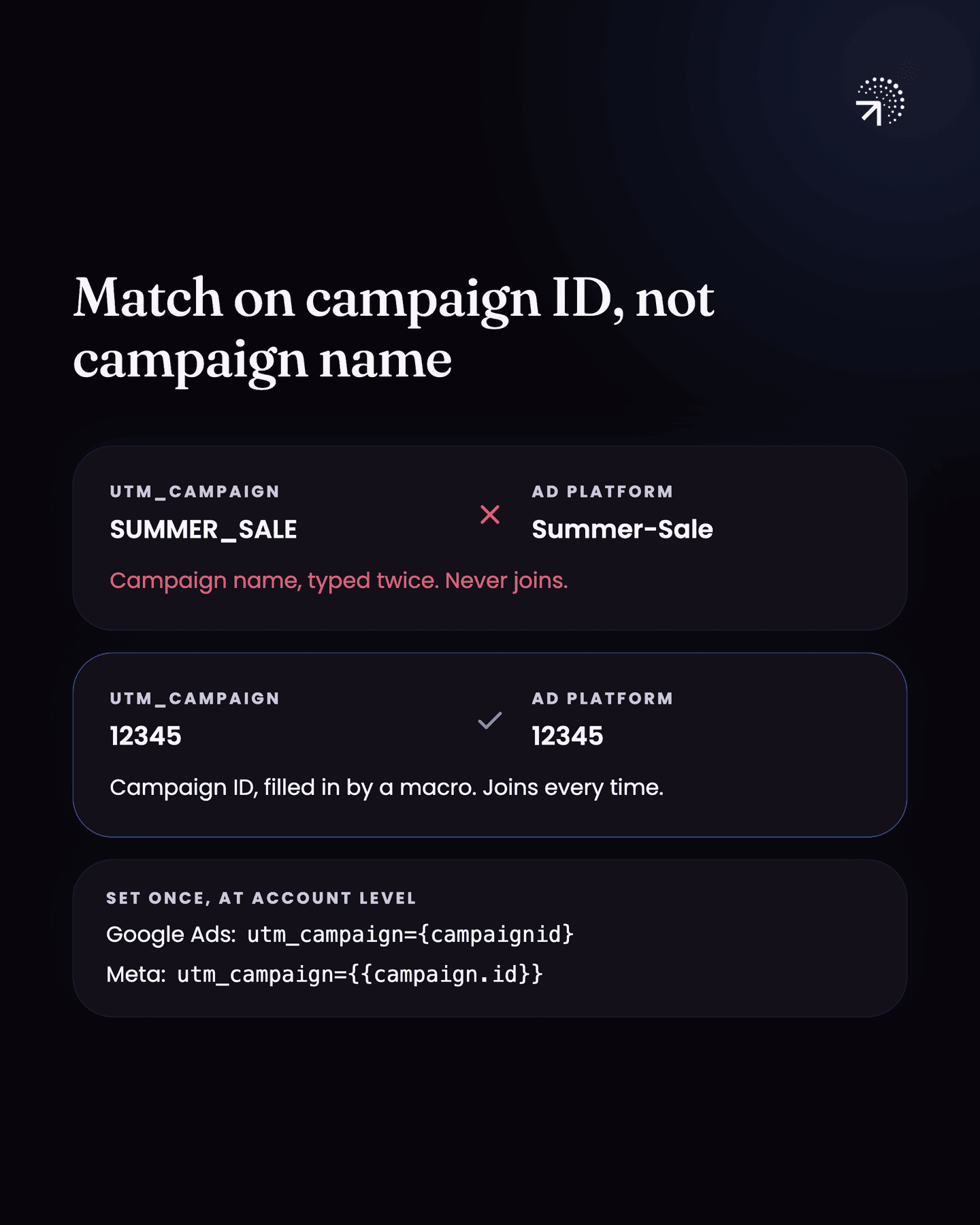
So make sure the value in your utm_campaign and the ID in your ad platform are exactly the same. Once the IDs match, you can put spend next to activation and retention for every campaign you run.
Similarly, you can match on Ad group, Ad ID, keywords, etc.
Common questions
How do you unify data from different analytics tools?
Land everything in a warehouse and join on the level both sides actually share. User-level sources join on your internal user ID; ad platforms only report per campaign per day, so that's the grain you can join them at.
Why doesn't my ad platform data match my product analytics?
Because they count different things at different grains. Ad platforms report spend and clicks per campaign per day and can't say which dollar reached which user, so the two only reconcile at campaign level, not per person.
Where should you unify your data?
In the data warehouse, not the analytics tool. Land your backend, product analytics, CRM, email and ad data there, then join them.
What should the utm_campaign parameter contain?
The campaign ID, not the campaign name. Fill it with the ad platform's campaign ID macro, set once at the account level, so the value matches the ID in the platform exactly.
Should you sync warehouse data back into tools like Mixpanel?
It's a product decision, and both sides cost something. Syncing needs a reverse ETL tool priced per record synced, with fields kept in step as your schema changes; querying in the warehouse costs nothing extra in tooling, but every question goes through someone who can write SQL.