Analytics in the age of AI: making agents trustworthy
AI can answer your analytics questions, but only with clean data, a written explanation of what it means, and the exact calculation for each core metric. Skip those and it still answers but a good chunk of the time the answer is wrong.
Founders are connecting MCPs to their analytics tools and asking them for their numbers. An MCPA connector that lets an AI tool read directly from another tool, such as your analytics platform or your database. It is what makes an agent able to answer questions about your own numbers.Glossary is a connector that lets an AI tool like Claude read directly from another tool, such as Mixpanel or your database. Others are pointing AI coding tools straight at their database or their codebase and pulling insights out the other end.
Both setups break in the same two ways.
How often does AI get analytics questions wrong?
You connect an MCP and ask it: get me my ActivationThe point where a new user reaches the first moment of real value in your product, rather than merely creating an account. Every product defines its own activation event, and that definition decides what your activation rate means.Glossary, and tell me why people are dropping off.
It comes back with something. Either the numbers do not make sense, or the analysis is so hard to follow that you cannot tell whether it is right.
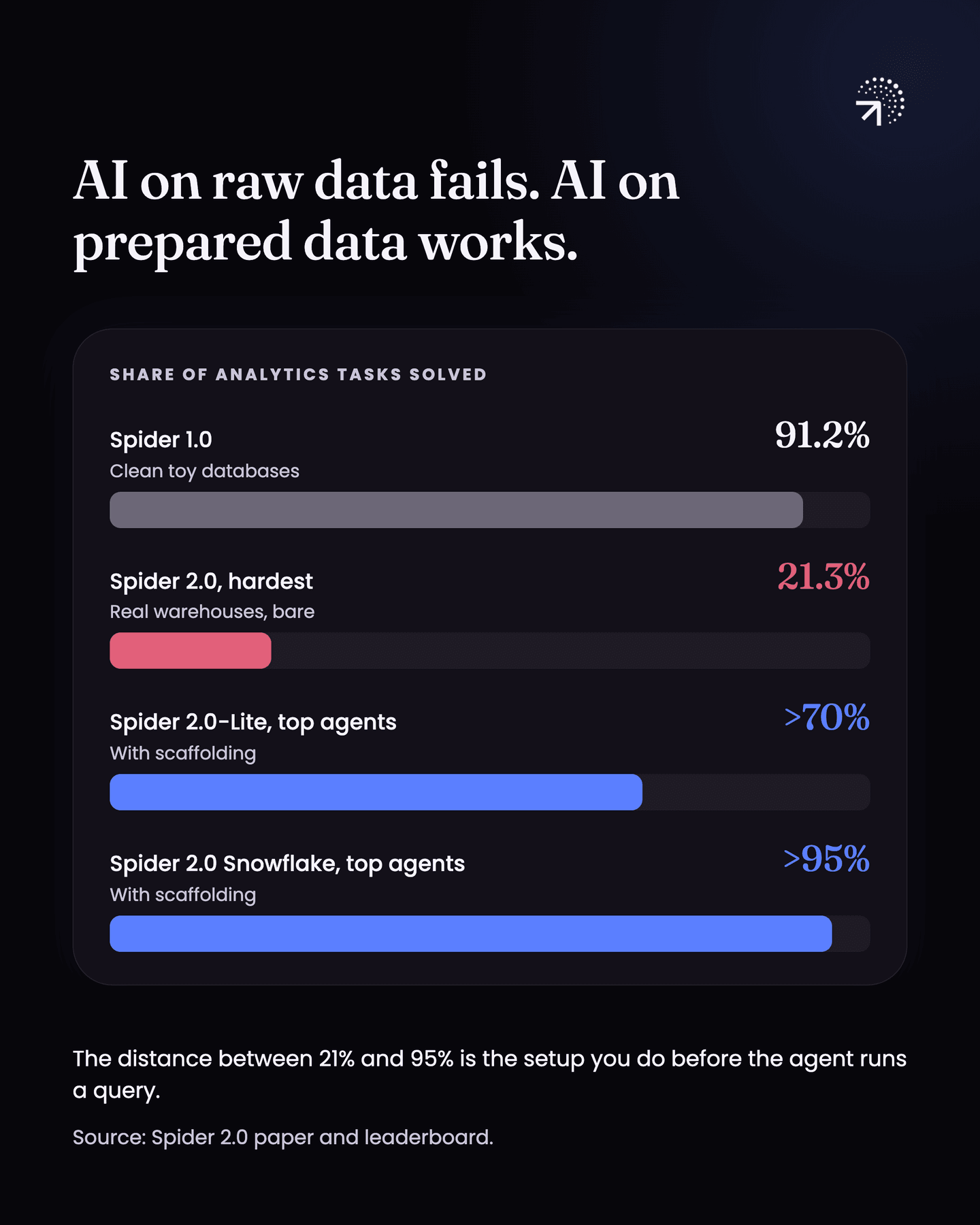
This is not just something I see with clients. Spider 2.0 is a benchmark, a standard test, that points AI at real company data warehouses and asks it real analytics questions. In the Spider 2.0 paper, an agent built on o1-preview solved 21.3% of the tasks. The same agent solved 91.2% on Spider 1.0, which ran on clean toy databases.
But look at what happens on the easier variants. On Spider 2.0-Lite the leading systems are past 70%, and on the Snowflake version some are past 95% (see the Spider 2.0 leaderboard). Those are not bare models pointed at a warehouse. They are agents with retrieval, schema context and a lot of scaffolding built around them.
That is the whole point. The distance between 21% and 95% is the work you do before the agent ever runs a query.
Why does AI give a different number each time you ask?
Because nothing pins the definition it uses. Ask for activation today. Ask again tomorrow, or have someone else ask. You can get a very different number, because the tool used a different definition each time.
I see this with RetentionThe share of users who come back. Bounded retention counts people who returned on exactly that day; unbounded counts that day or any day after, and the two give very different numbers.Glossary constantly. Companies ask for the number, they look at it, and they report it without checking. Then someone finally checks how that retention was calculated, and how it should have been calculated, and it turns out to be the wrong way entirely.
It was calculated the wrong way, it happened to produce good numbers, and that is where the mess starts.
So there are two things worth getting right.
- What is the right way to set up analytics in the age of AI?
- How do you make the agent smarter, so it does not mess up these simple things?
Let's get into it.
How should you set up analytics for AI?
Start with clean data.
If you are using a Product analyticsThe analysis of what users do inside your product. The test is whether you can point at a row of data and name the user who did it.Glossary tool, you need a clean data structure underneath it. Clear events, clear properties, and a clean Tracking planOne sheet listing every event you track, when it fires and the properties it carries. Written before implementation, owned by someone who is not a developer.Glossary.
That tracking plan then goes into your agent. You can paste it into Claude, load it as a skill, a saved set of instructions Claude can pull in when it needs them, or keep it wherever your agent can read it. It tells the agent what event fires when and what properties it carries. It becomes the source of truth for what actually happens in your product.
If you are connecting to your database instead, stop before you point anything at Raw tablesYour data exactly as it lands, before anyone has cleaned, joined or organised it. Querying it directly costs compute on every question and time on every join.Glossary. Raw tables are your data exactly as it lands, before anyone has cleaned or organised it.
Model your data first, into a format clean enough and simple enough for an agent to understand. Connecting raw data is how you break this. The agent burns a lot more compute, which is processing time you pay for, and the mess in your data works against you.
Then add a semantic layer.
A Semantic layerA written guide between your data and anyone querying it, human or AI, saying what each table or event contains, how things join, and what each core metric actually calculates.Glossary is a written guide that sits between your data and the AI and tells it what everything means. Some people call it a knowledge base. Whether you use an analytics tool or a database, it does the same job. It tells the agent:
- what each table contains
- how the tables join
- a few sample metrics
- your business context
- the schemas of those tables or events
along with whatever else it needs to know where to focus.
This matters more than it sounds, because it changes how the whole setup fails.
Without a semantic layer, a wrong answer comes back looking exactly like a right one. A number, formatted properly, with an explanation attached to it. Nothing about it tells you to go and check, so it ends up in a board deck.
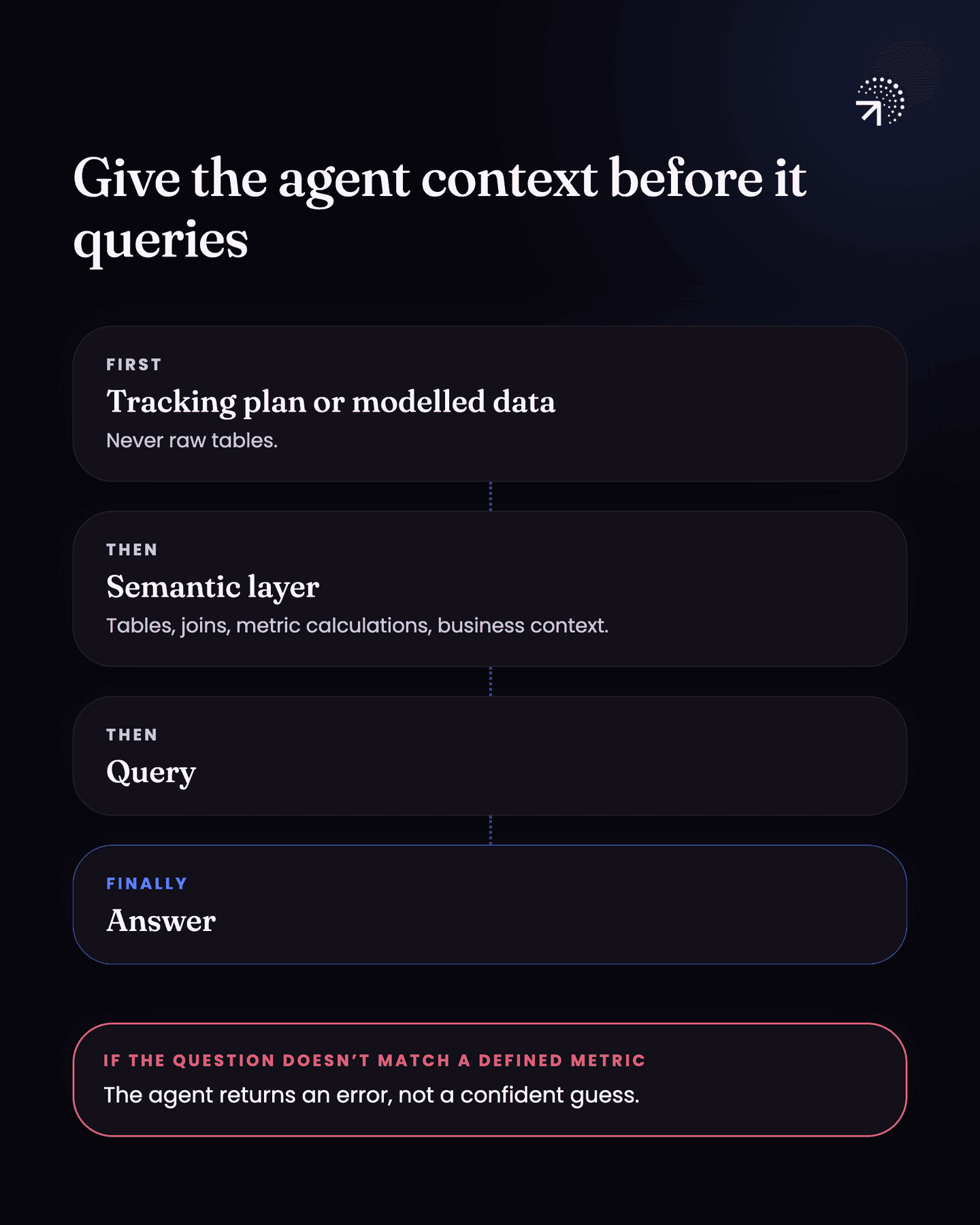
With one, the agent is picking from a fixed set of metrics and dimensions you already defined. Dimensions are the ways you slice a metric, like plan, country, or sign-up month. If a question does not match anything you defined, there is nothing to pick, so the agent fails with an error rather than a guess.
| Without a semantic layer | With a semantic layer | |
|---|---|---|
| What the agent picks from | Whatever it finds in your tables or events | A fixed set of metrics and dimensions you already defined |
| Same question, asked twice | Can use a different definition each time | Uses the calculation you pinned |
| A question that matches nothing you defined | A guess that looks exactly like a right answer | An error |
Then the agent.
Whether you build your own, use Claude, or use an MCP, the sequence is the same:
Tracking plan or modelled data → semantic layer → query → answer
It looks at the tracking plan or your modelled data before it queries anything. Then the semantic layer, so it has full context on the data, on how to read it, and on which table to use when. Only then does it query and give you the answer.
That is the simple version of how you should set this up. I am not going to go deeper into the technical side here.
How do you make an AI analytics agent smarter?
Give it frameworks. Tell it that when someone asks for a root cause analysis, this is the format to follow. When someone asks why activation is low, this is the framework to work through. And so on for the questions you ask most often. "A general framework for any product problem" is a good one to start with.
If you want to use AI for analytics today and actually trust what comes back, that part is not optional.
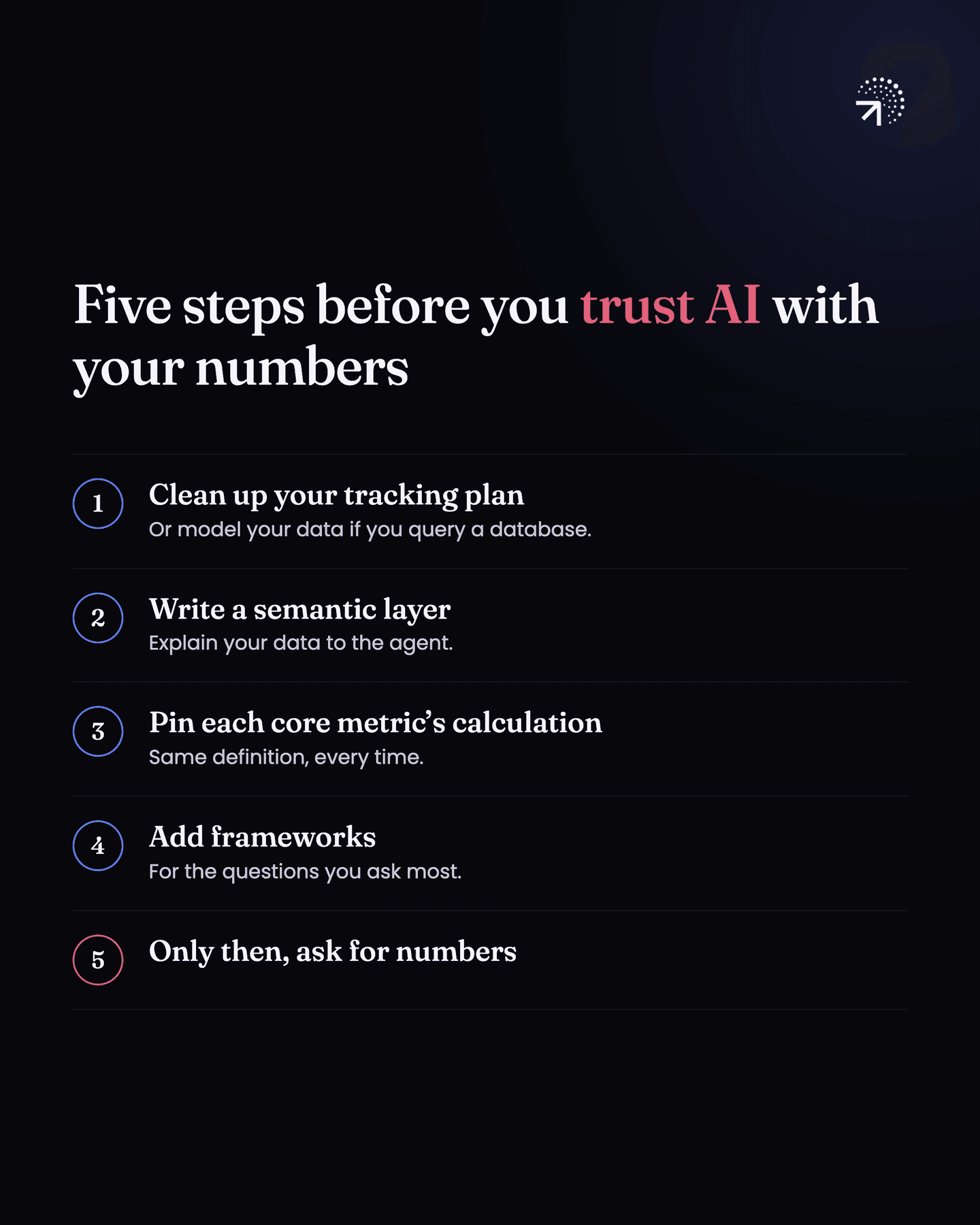
So, in order:
Clean up your tracking plan
Or model your data, if you query a database.
Write a semantic layer
It explains your data to the agent.
Pin the exact calculation for each core metric
In the semantic layer, so the definitions cannot move underneath you.
Add frameworks for the questions you ask most
Root cause analysis, activation, and whatever else comes up weekly.
Only then start asking the agent for numbers
Before this point it still answers, and a good share of the time it is wrong.
Common questions
Can AI do product analytics?
Only on top of foundations you've built. Give it a clean tracking plan or modelled data, a semantic layer explaining what everything means, and the pinned calculation for each core metric. Without those it answers confidently and often wrongly.
What is a semantic layer?
A written guide sitting between your data and the AI that says what each table or event contains, how things join, what your core metrics are and what business context applies. Some people call it a knowledge base.
Should you connect an AI agent straight to your raw database tables?
No. Model your data first, into tables clean and simple enough for an agent to understand. Pointed at raw tables, the agent burns a lot more compute and the mess in your data works against you.
Why does AI give a different number each time you ask for the same metric?
Because it can use a different definition each time. Pin the exact calculation for each core metric in the semantic layer, so the definition cannot move underneath you.
What is an MCP?
A connector that lets an AI tool like Claude read directly from another tool, such as Mixpanel or your database.