Analytics data loss: why you're missing 15-20% of events
If your tracking runs entirely in the browser, ad blockers take at least 15 to 20%. Route through your own domain and send core events from your backend. If your users are technical, developers and designers and anyone who lives in a browser with an ad blocker running, the loss is worse than that.
I'm using Mixpanel in the examples. The same applies to PostHog and Amplitude.
How do you check whether you're losing analytics data?
Pick a core event you can count somewhere else as well. Signups are the easiest one, because your database already has the real number.
Take yesterday, count the signups in your database, then count the same event in Mixpanel for the same window.
If Mixpanel is lower, that gap is your data loss. A gap of a percent or two is normal timing noise and isn't worth chasing. Anything in double digits means your client-side tracking is being blocked, and the rest of this chapter is for you.
Why does client-side tracking lose data?
Ad blockers recognise the big analytics tools and block the requests going to them.
Most teams set up tracking with the SDK that Mixpanel or any of these tools provide. The SDK is the small piece of code your engineer adds to the product so it can send events.
With the usual setup, the data goes directly from the user's browser to Mixpanel. A lot of people run ad blockers, and those blockers already recognize Mixpanel, PostHog and Amplitude, so they block the request. You miss out on all of those users.
I use the Arc browser myself, and client-side tracking doesn't work on it at all.
Fix one: how does a proxy reduce data loss?
The solution is to set up a proxy. It's still your client-side tracking, but the data now moves from the browser to one of your own subdomains, an address under your own domain like t.yourproduct.com, and from there to Mixpanel. Ad blockers are unlikely to block your own subdomain. PostHog's reverse proxy guide gives the reason: ad blockers keep lists of known analytics domains, and yours isn't on them.
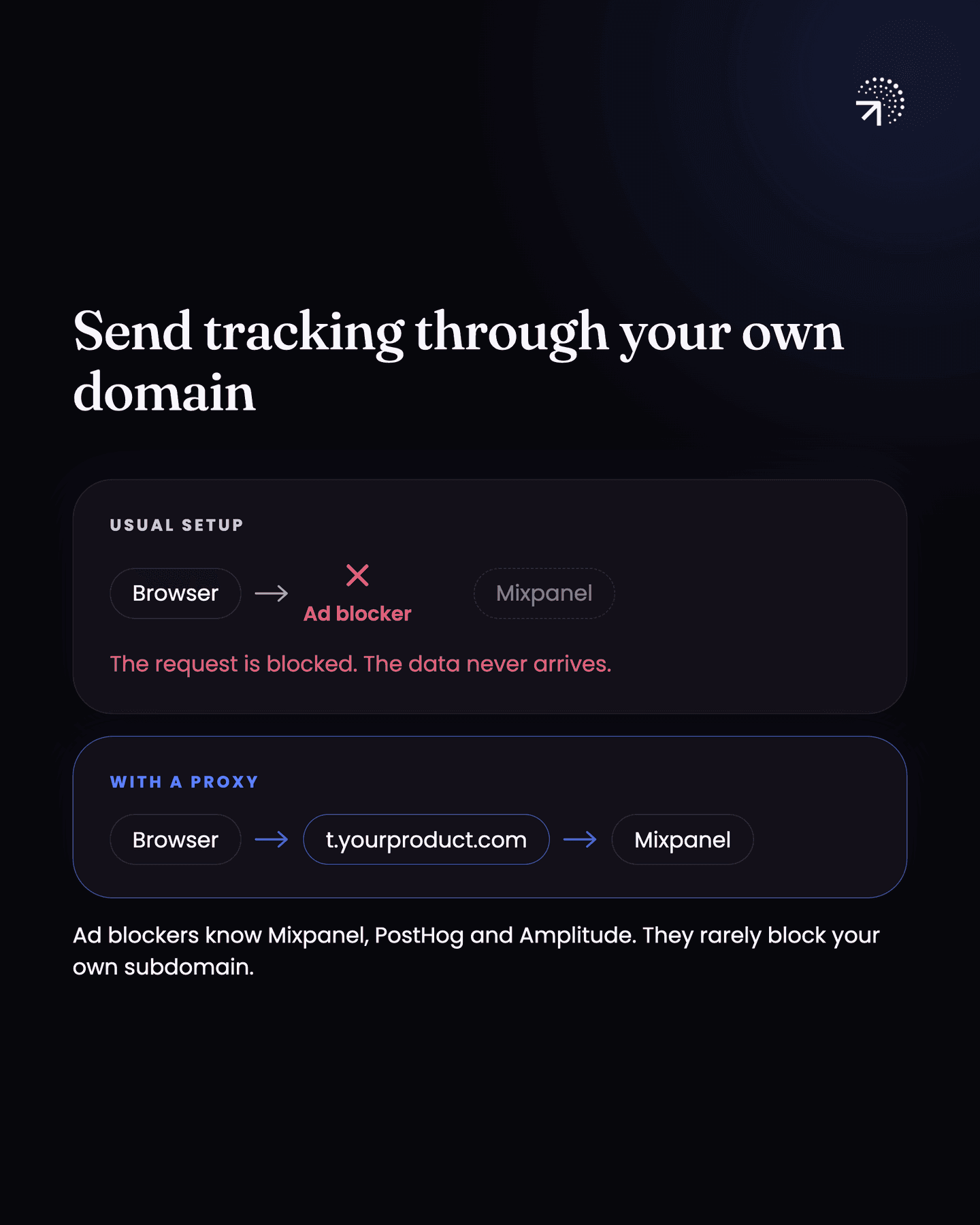
That cuts your data loss a lot. It's still not going to be zero, but it drops to a small fraction of what you were losing. You also keep everything client-side capture gives you, like city, browser, OS and app version.
This is a job for your engineer. Each tool documents the setup: Mixpanel under tracking via proxy, PostHog in its reverse proxy guide, and Amplitude under Domain Proxy.
On mobile apps the data loss is much lower, so a pure client-side setup should be fine. A proxy is still recommended, and if you do see data loss happening, the first thing to do is set up a proxy.
Fix two: which events should you send server side?
Your core events: sign-ups, payments and core feature usage.
Server side means sending data directly from your backend, your own servers, to any of these tools. This data can't be blocked, so it matches your database, as long as your backend retries a request that fails. It's the best way to set up your tracking so you know your numbers are real.
You could send everything server side. But you'd lose out on a lot of auto-capture events and properties.
Auto-capture is the detail the browser SDK collects on its own, without anyone coding it. Properties that arrive for free client side, like UTM sources (the tags on a link that say which campaign sent the visitor, covered in "MMPA mobile measurement partner: the service that attributes an app install to the campaign that caused it, which UTM parameters cannot do because they do not survive the app store.Glossary and UTMTags added to the end of a link that record where a click came from. Enough on their own for a web-only product, and useless the moment an app install sits in the path.Glossary") country, browser, browser version, etc. On server side, you'd have to configure every one of them yourself, which is a big mess.
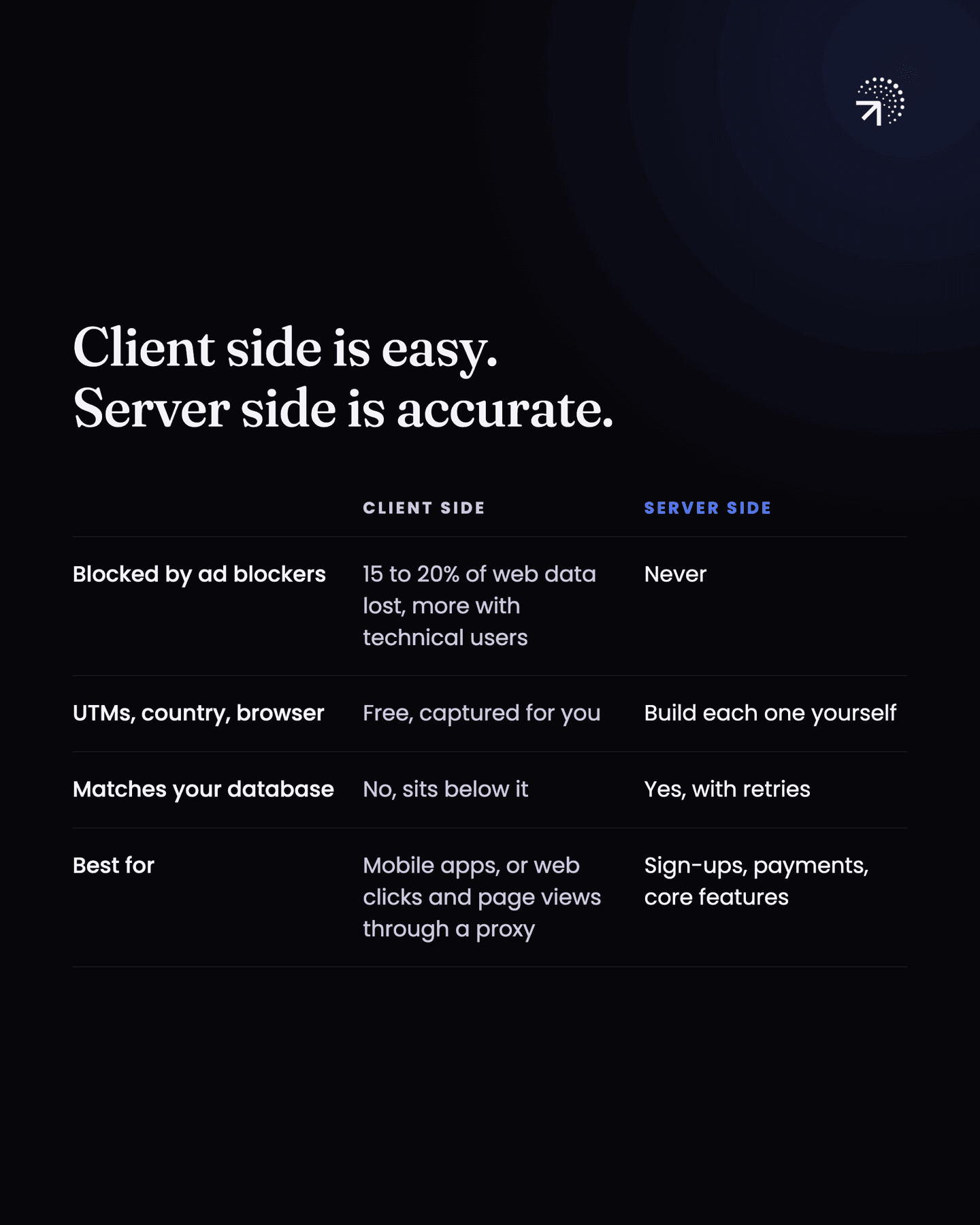
So I suggest a split:
- Proxy side: user interactions, like clicks and page views. These are much easier to implement here.
- Server side: your core events. Sign-ups, payments, your core feature usage.
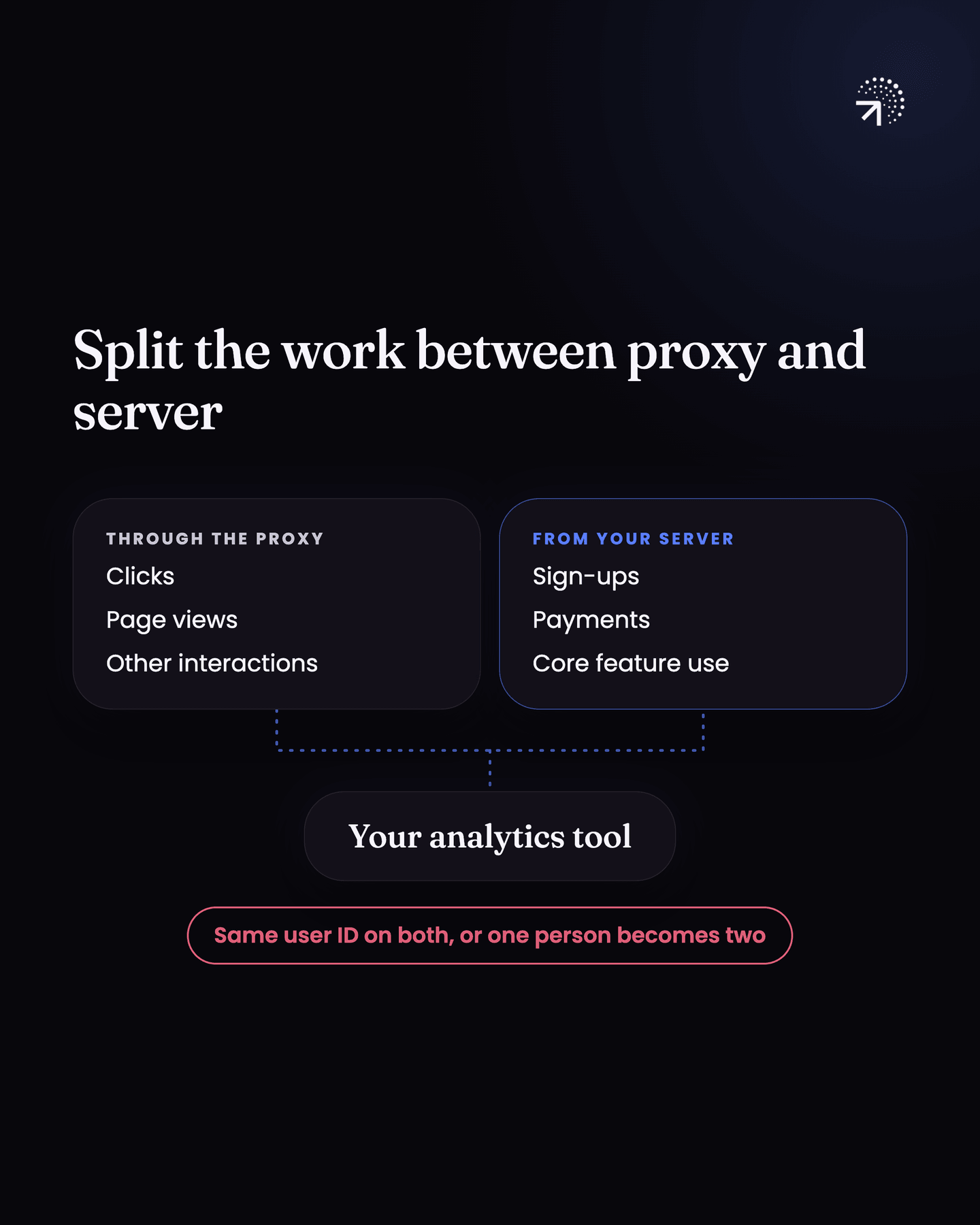
| Client side | Proxy side | Server side | |
|---|---|---|---|
| Blocked by ad blockers | Yes, 15 to 20% at minimum on the web | Rarely | Never |
| UTM, country, browser and device detail | Automatic | Automatic | You configure every one yourself |
| Matches your database | No | Mostly | Yes, as long as your backend retries a failed request |
| Use it for | Mobile apps, where data loss is much lower, though a proxy is still recommended | User interactions, like clicks and page views | Sign-ups, payments, core feature usage |
Why must proxy and server-side events use the same user ID?
The user ID you send with proxy-side events has to be exactly the same as the one you send with server-side events. If it isn't, the platform can't map them, and you'll see the same user as two different profiles.
This is a very common mistake I've seen across setups. Be careful on that. The next chapter, "Identity stitchingJoining all of one person's activity into a single profile, whatever device or browser it arrived from. Get it wrong and every per-user number is wrong in the same direction.Glossary", goes deeper on this.
Common questions
How much analytics data do ad blockers block?
At least 15 to 20% for client-side web tracking, and considerably more if your users are technical. Developers and designers are the most likely group to be running a blocker.
How do you fix analytics data loss?
Two fixes. Route browser tracking through your own domain so requests are first-party rather than calls to a known analytics host, and send your core events server side from the backend where no blocker can reach them.
How do you measure analytics data loss?
Pick a core event you can also count in your database, like signups, and count it in both for the same day. The gap is your data loss. A percent or two is timing noise; anything in double digits means your client-side tracking is being blocked.
Should you send all analytics events server side?
No. Server-side events can't be blocked, but you lose auto-captured properties like UTM source, country and browser, and have to configure each one yourself. Send core events like sign-ups and payments server side, and route clicks and page views through a proxy.